We’re excited to introduce a new Multi-Room Calling feature that makes communication between caregivers and patients even easier and more reliable.
✨ What’s New
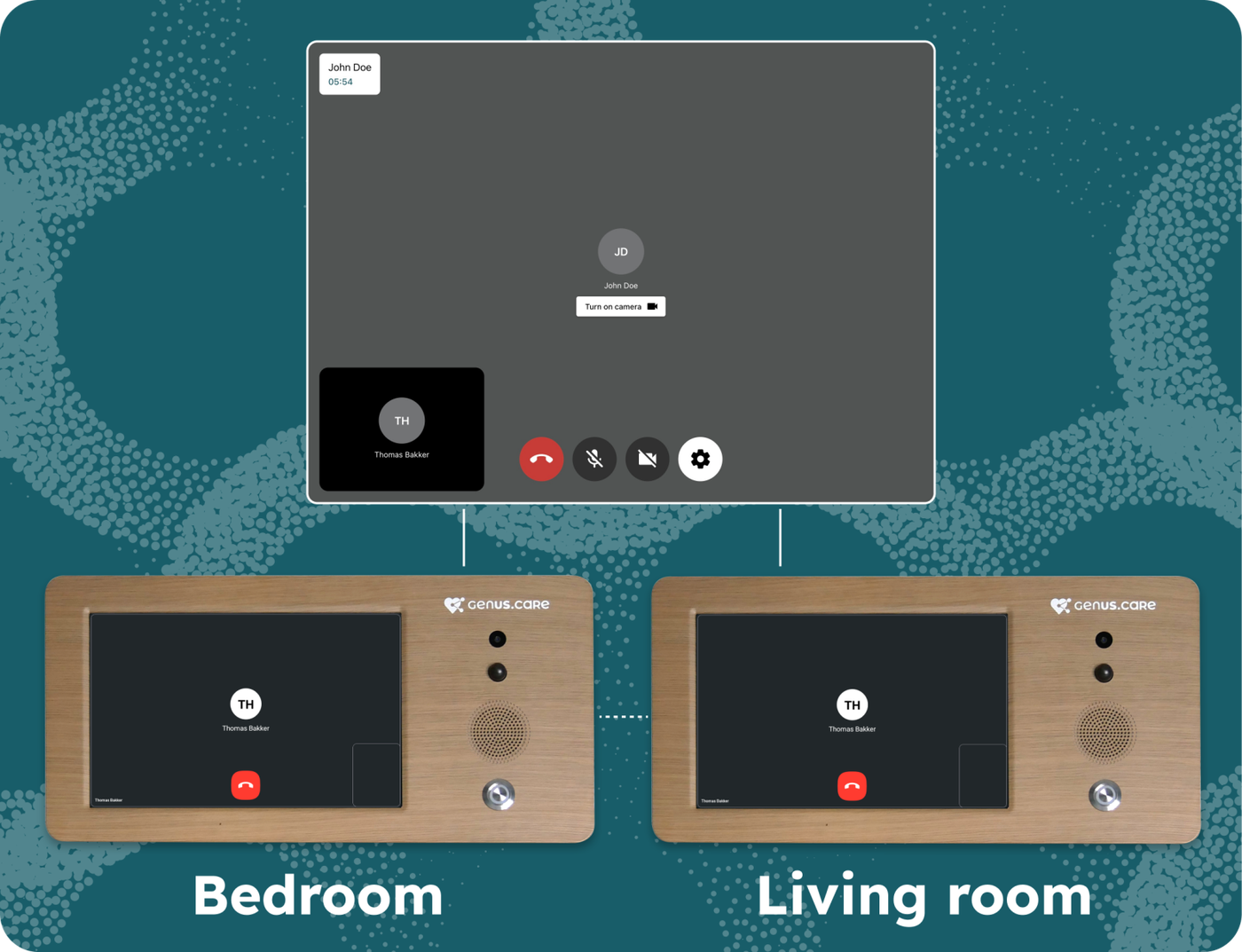
Call all rooms at once: If a patient has Genus devices installed in multiple rooms, caregivers can now start a video call that rings all Genus devices simultaneously.
Unified audio stream:
All patient Genus’ microphones are streamed directly to the caregiver, so caregivers can hear the patient no matter which room they are in.
The caregiver’s voice is played through the speakers of all Genus devices at the same time, ensuring the patient never misses a word.
Patient Genus devices do not broadcast audio to each other, preventing unwanted echo or noise between rooms.
🎯 Benefits
Caregivers can easily reach patients wherever they are.
No need for the patient to move to a specific room to answer a call.
Clear, centralised communication without distracting cross-room audio feedback.
Introducing noise cancellation for the Genus. The Noise Cancellation feature is an invaluable tool designed to enhance the audio quality in (video) calls where unwanted background noise can degrade the listening experience. By leveraging advanced Artificial Intelligence (AI) algorithms, this feature intelligently identifies and suppresses extraneous sounds, ensuring clear and crisp audio output.
Key benefits
Enhanced Audio Quality: Eliminates unwanted noise, including background chatter, clicks, claps, barking, and other sudden audio disturbances, resulting in a more pleasant listening experience.
Improved Clarity: Ensures that the primary audio content remains prominent and intelligible by reducing distractions caused by ambient noise.
Optimised Communication: Facilitates seamless communication in (video) calls by minimising disruptions caused by environmental factors, thereby enhancing the overall professionalism of the call.
How to use Noise Cancellation
Genus users
In the Community Portal (portal.genus.care) go to the user you want to enable Noise Cancellation for.
Scroll down to the "Genus settings" card
Click "Edit"
Select "Noise cancellation (for call)"
Click "Save"
Noise Cancellation is now enabled for all calls made to the Genus.
3rd Parties using the Genus API's
3rd parties that are integrated with the Genus API to create calls to a Genus can pass the new enableNoiseCancellation parameter in the requests to create a call URL. This will enable Noise Cancellation on the call.
We're proud to introduce a full range of connected sensors - alongside a brand-new Routines engine - designed to enhance safety, comfort, and peace of mind in the home.
With sensors for 𝘮𝘰𝘷𝘦𝘮𝘦𝘯𝘵, 𝘩𝘶𝘮𝘢𝘯 𝘱𝘳𝘦𝘴𝘦𝘯𝘤𝘦, 𝘥𝘰𝘰𝘳 𝘢𝘤𝘵𝘪𝘷𝘪𝘵𝘺, 𝘵𝘦𝘮𝘱𝘦𝘳𝘢𝘵𝘶𝘳𝘦, 𝘭𝘪𝘨𝘩𝘵, 𝘩𝘶𝘮𝘪𝘥𝘪𝘵𝘺, 𝘢𝘯𝘥 𝘮𝘰𝘳𝘦, Genus can now monitor the living environment with exceptional detail. Combined with our intelligent alerting system, caregivers receive real-time insights and updates on any unusual patterns or anomalies.
At the heart of this update is our Routines engine, built in-house to provide simple, powerful tools that help caregivers tailor support to the needs of those they look after.
Connecting a new Zigbee Gateway
To connect our new Zigbee Gateway to your Genus follow the following steps:
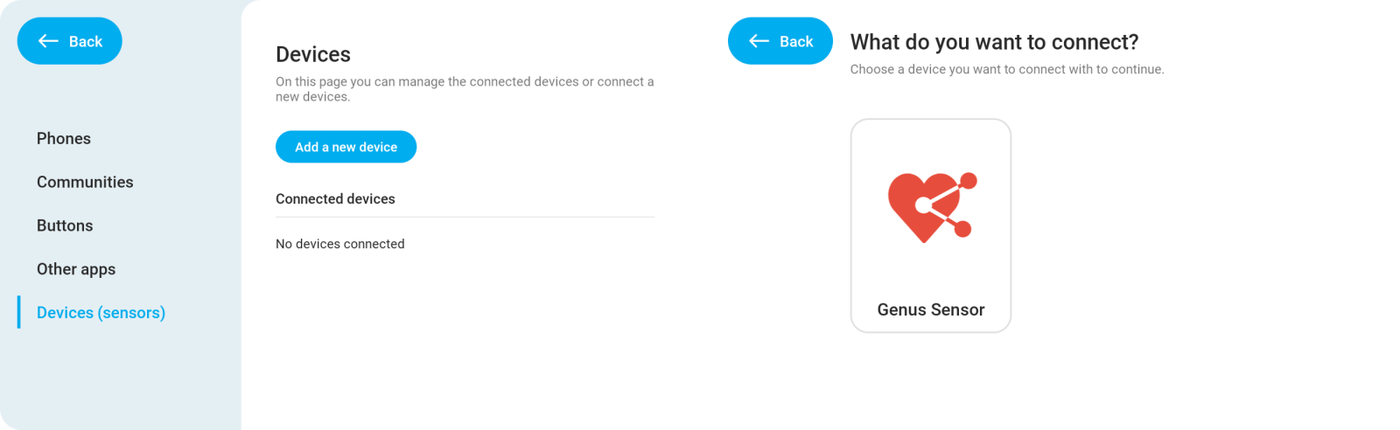
Go to the new Devices page by navigation through "Menu" > "Connect" > "Devices (sensors)".
Tap "Add a new device" to start the set up flow.
The Genus will ask you what to connect. Tap "Genus Sensor".
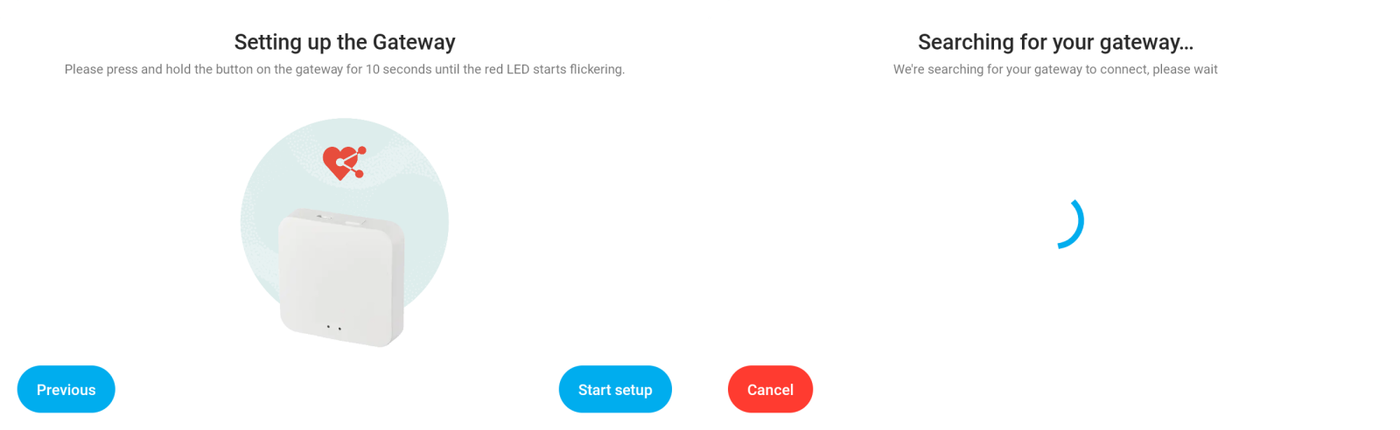
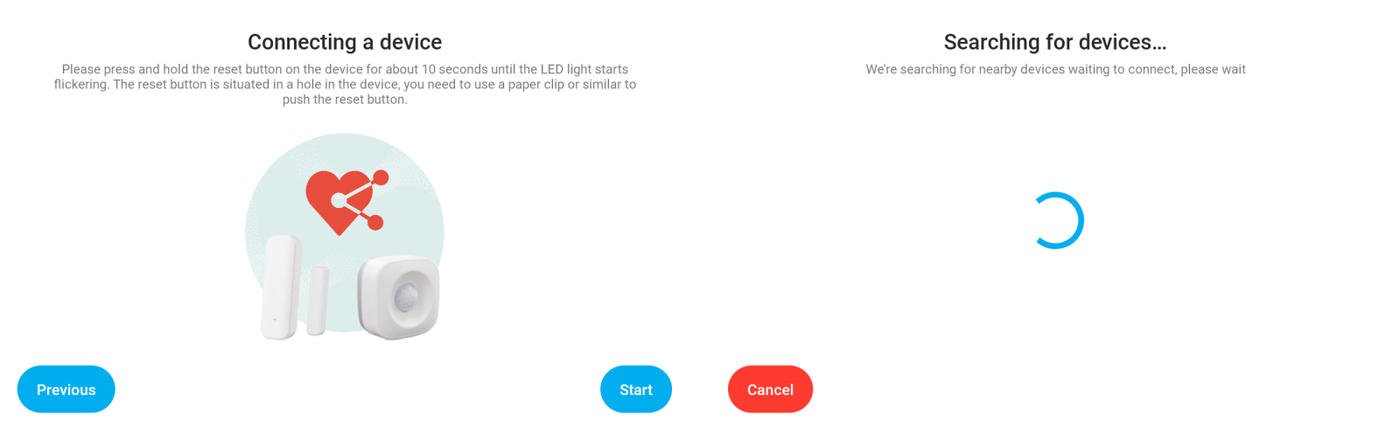
Now connect your Zigbee Gateway to a power plug and press and hold the reset button for 10 seconds. The red LED will start flickering.
Tap "Start setup".
The Genus will now search for your Zigbee Gateway.
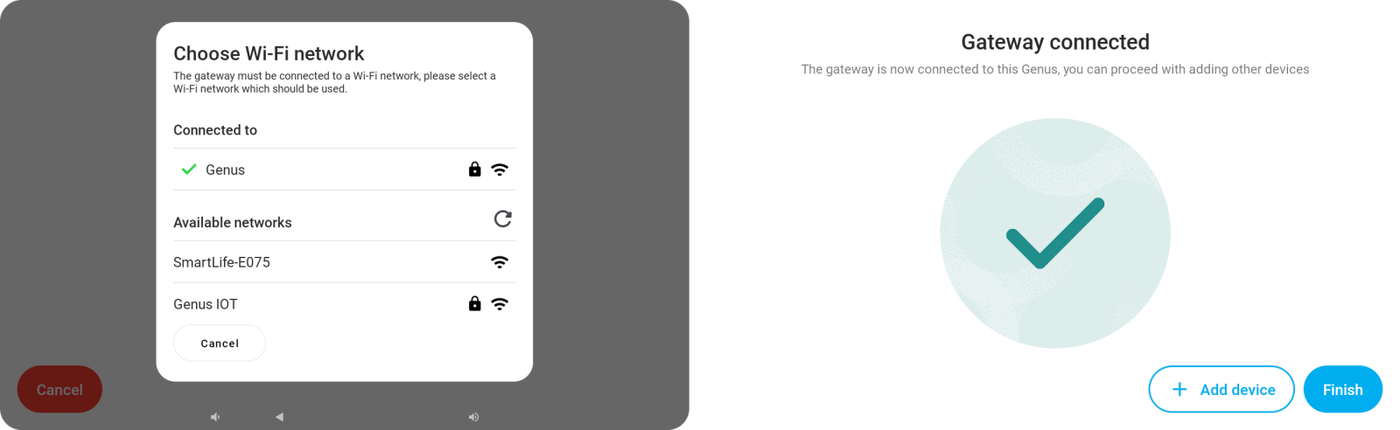
When the Genus has discovered the Zigbee Gateway, it'll ask to which network you want to connect the Zigbee Gateway.
Select the network you want to connect the Gateway to. If your wifi has been set up after March 18th it'll automatically fill in the Wi-Fi password. If not you'll have to enter the Wi-Fi password in a follow-up prompt.
Once the Gateway connects to the Wi-Fi, the Genus will show a success message. You can finish the installation here by tapping "Finish" or start adding Genus sensors to your Gateway by tapping "Add device".
Adding a Genus sensor
To add a Genus sensor such as a door sensor, human presence sensor, pir sensor or fall sensor follow the following steps:
Go to the new Devices page by navigation through "Menu" > "Connect" > "Devices (sensors)".
Tap "Add a new device" to start the set up flow.
Make sure the plastic lip between the battery and sensor is removed.
Press and hold the reset button on your sensor for 10 seconds. A LED will start flickering.
Now tap "Start" and the Genus will search for your sensor.
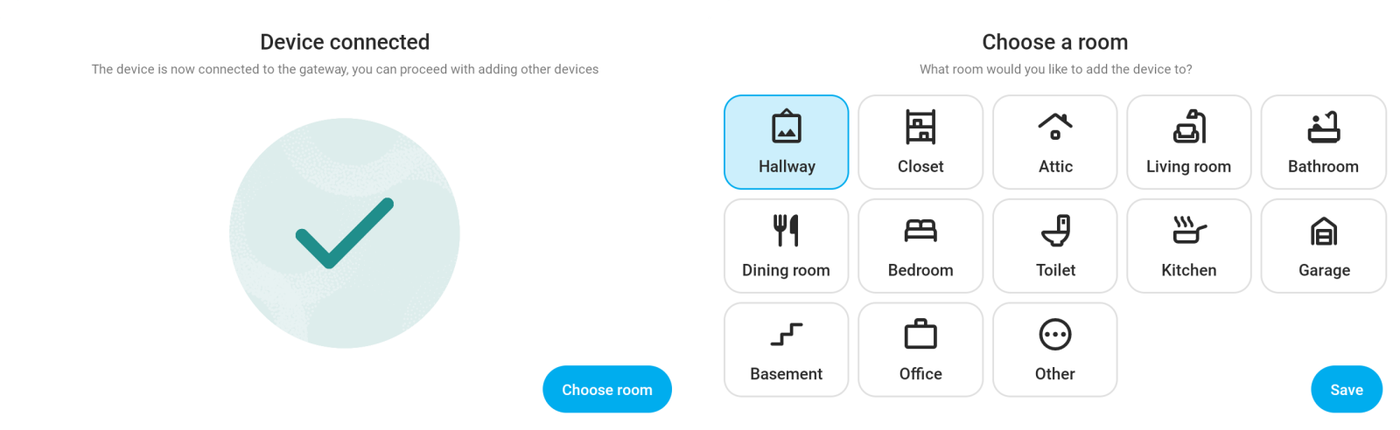
Once it's found the Genus will automatically pair the sensor with your Zigbee Gateway.
Select a room in which the sensor will be placed and tap "Save".
Testing your sensor or change it's name / room
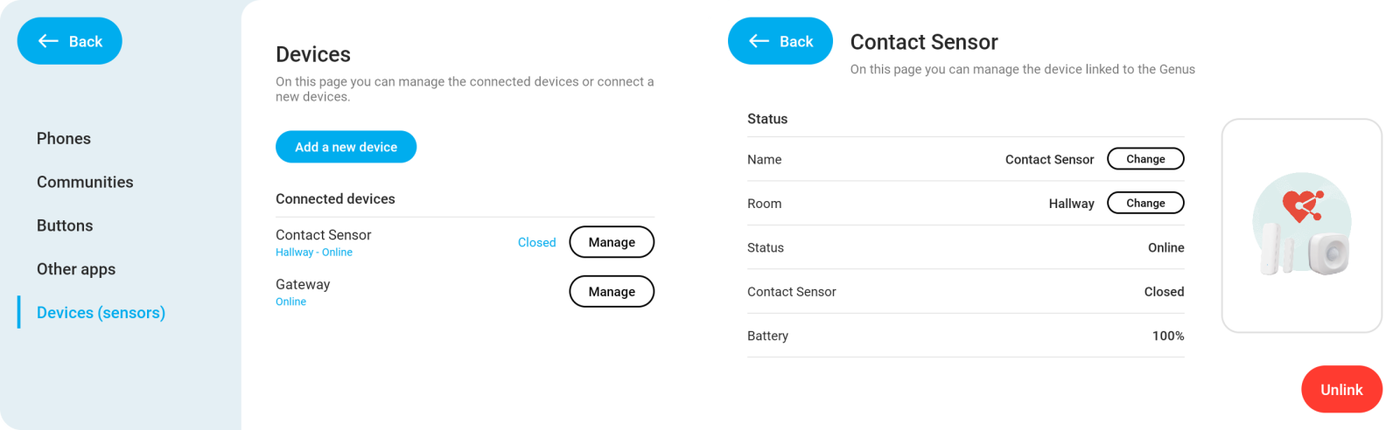
On the devices page you'll see an overview of all your connected sensors along with their current status. This information updates automatically when a sensor triggers something. This way you can easily test all the sensors in your home. For example: Walk to your door, open it and check if the Contact Sensor changes from "Closed" to "Open".
If you want to see more information about your sensor such as the battery level or want to change the room or name, you can tap "Manage" and the Genus will show you a page where you can see this extra info. Here you can also remove the sensor from your Genus.
Setting up a Routine
Now that you've set up the sensors you want to do something with it. Sensors can be added to our Routine engine through the Community Portal.
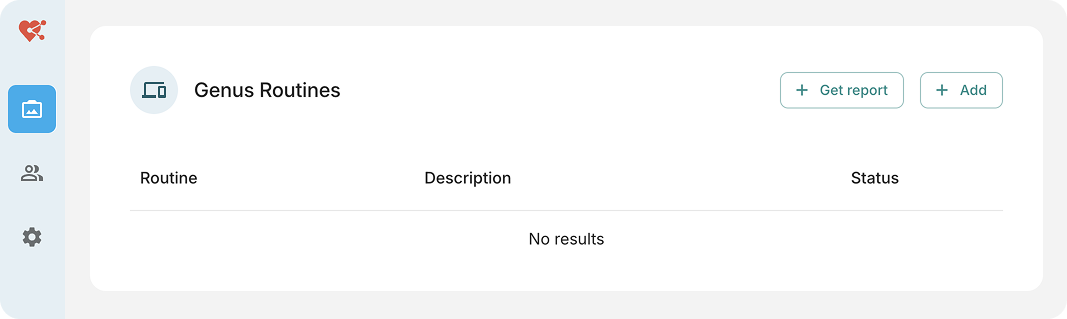
Scroll down till you see the "Genus Routines" card.
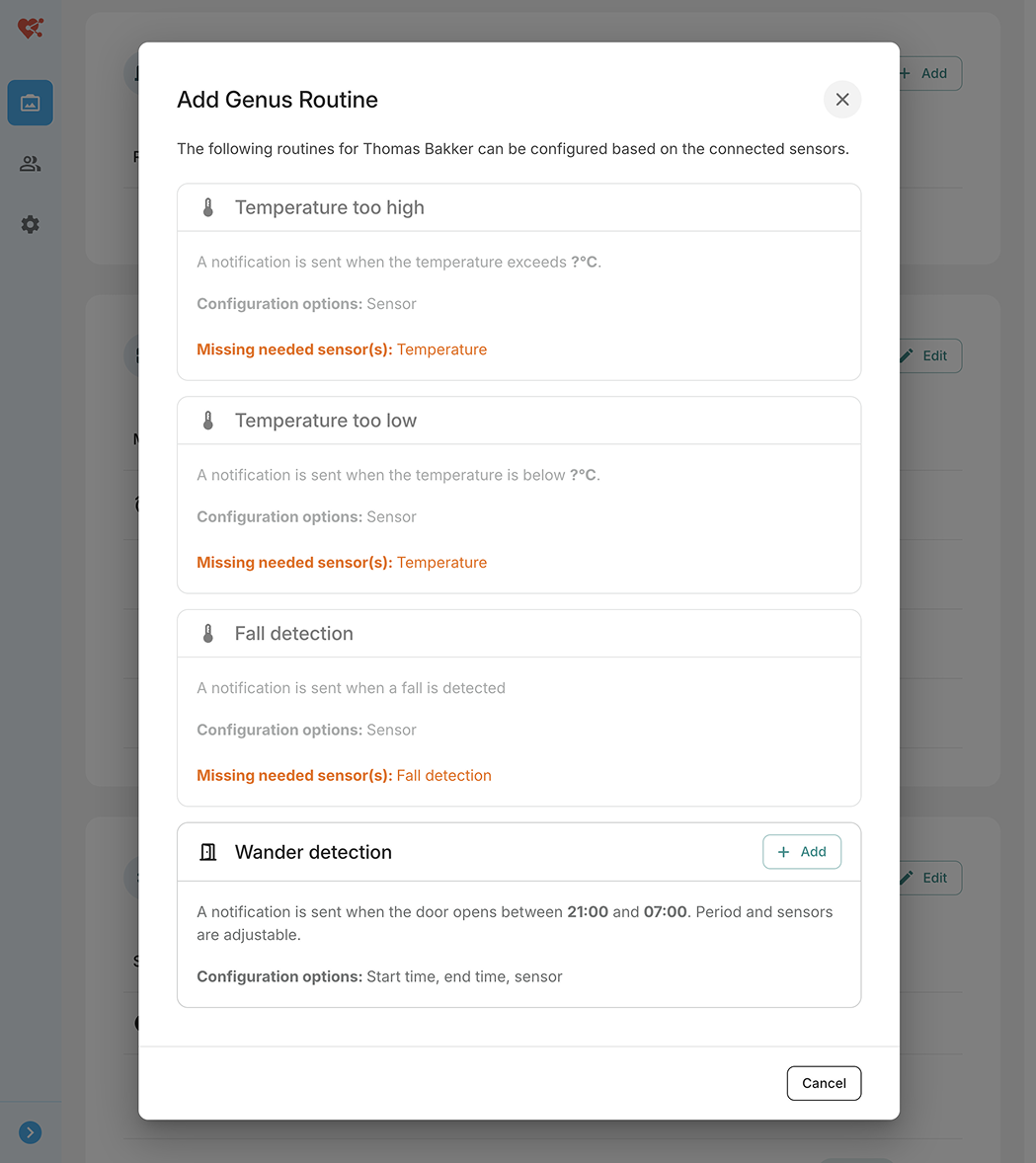
Click "Add"
You'll see a list of Routines that are available. In this case the user only has a contact sensor (door sensor) configured so you'll only be able to set up Routines that require a contact sensor.
Click the "Add" button for the Routine you want to configure.
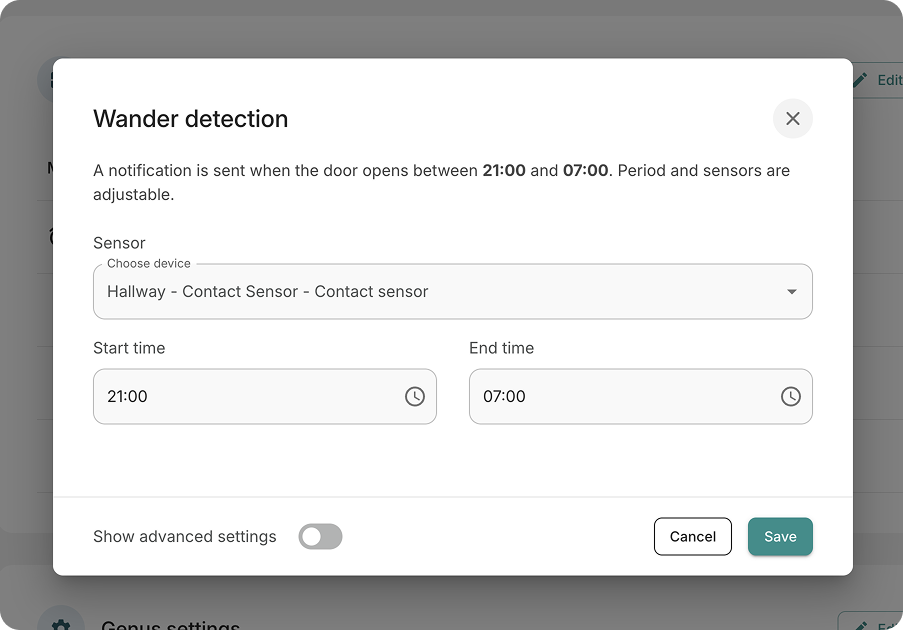
You can configure the Routine to your liking
Click "Save" when you're done.
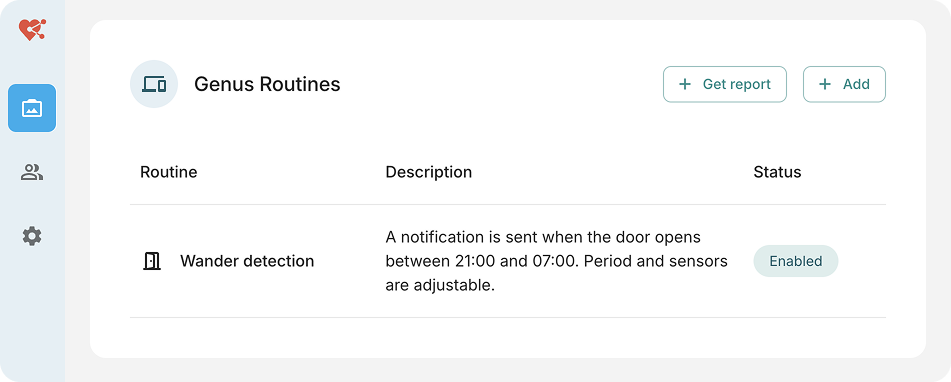
The Routine will now be shown in the list of configured Routines.
You can always edit your Routine by clicking it.
When the Routine is triggered it'll send a message or alarm to the Genus.
Generating a report
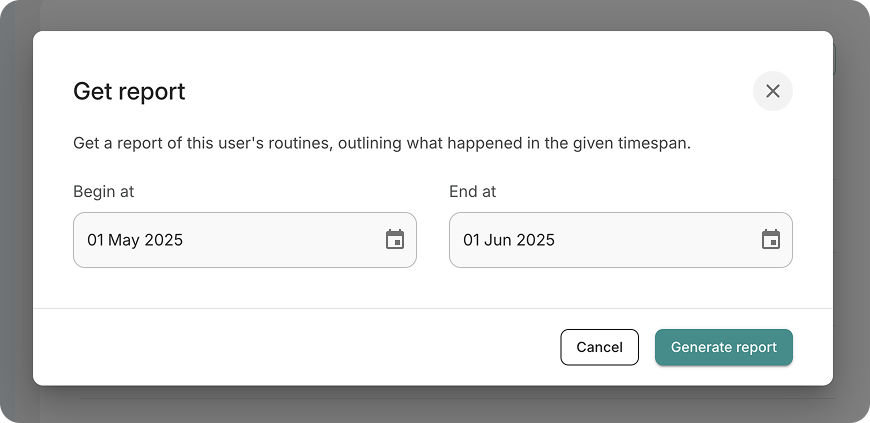
It's possible to generate reports for your user to generate an overview of room visits and triggered routines.
Go to the "Genus Routines" card in the user detail and click "Add Report".
Specify a start- and enddate you want to generate the report for.
Click "Generate Report".
Your browser will now download a PDF. Locate the file in your Downloads folder.
Improved performance & accuracy of unusual day start evaluation
iOS
Replaced all old logo's / graphics with new Genus house style
Introduced a new app icon with preparation for iOS 26 glass effects
Genus
Last name of caregiver that sends a message to the Genus is not shown on the Genus anymore to improve privacy of caregivers
Deployer App
Allow sending a deployment to Genus devices that haven’t updated their heartbeat yet. This way you can deploy or transfer a Genus before it boots up. Enhancing the deployment / transfer process when needing to deploy a lot of Genus devices at the same time.
Updated the software of the Genus with the following changes:
Delay automatic shutdown when in a call
If you are calling, and the Genus's battery percentage is below a certain threshold, wait until the call is done before shutting down, in case of an emergency call
Added option in system test to choose if the serial number is correct
Fixed issue where excessive logging was happening if there was no internet connection
Fixed issue where timezone might not always be correct on boot
It's now possible to send messages to the Genus from the Android & iOS apps.
To send a message go to a user and tap the "Send message" button next to the "Video call" button. Once the Genus user answers the message, you'll get a notification and see the answer on the home screen.
Other updates regarding the phone apps:
The design of the iOS app has been improved to align better with the Android app and implement the new Genus corporate identity.
Fixed a bug where you'd see a "Could not load notifications" message on the bottom of the screen.
Text in buttons on Android should scale better on phones with larger texts enabled.
You can download the original marketing pictures in the attachments below
The Genus now supports enterprise wifi. This is configurable on the Genus itself as well as in the deployer.
In the business portal > community configuration, there is now a dedicated wifi card where you can configure the enterprise network. Note that the enterprise wifi will only be configured on Genus devices updated to the latest app version.