

The Genus 4G GPS Button
A client who goes out for a walk can take help along: the Genus 4G GPS Button (GC-SOS), a small button with its own SIM card and GPS. A client who has fallen in the park wants to know that the alarm has arrived and that someone is coming.
In January and February 2024 the button learned to speak. It tells the client that the alarm has arrived, who is coming and when the alarm is cancelled. It also raises an alarm by itself when it detects a fall, and it is easier to pair, find and set up.
What’s new
- Clients hear from the button that their alarm has arrived, who is coming and when the alarm is cancelled.
- Clients who fall get help without pressing: with fall detection switched on, a fall raises an alarm.
- Installers can pair a button in a place where it has no mobile data at that moment.
- Care professionals see a client’s buttons on the client page of the Community Portal, with the last known location on a map.
- Care professionals and installers switch fall detection on and set the volume of the button on the client’s Genus.
For clients: the button says what is happening
Section titled “For clients: the button says what is happening”After a press on the alarm button, the button speaks at each step of the alarm. It uses the name of the person who answers: the name a family member uses in the Genus app, or the full name of the care professional.
| When | The button says |
|---|---|
| The alarm has reached Genus | Alarm was received |
| Someone answers that they are on their way | Mark is on his way |
| Someone answers that they will come later | Mark is coming later |
| Someone answers that they cannot come | Mark can’t come right now |
| Nobody has answered a few minutes after the alarm | We have not been able to reach anyone yet |
| The alarm is cancelled on the Genus | The alarm has been cancelled |
| The alarm could not be delivered | Failed to send the alarm |
Family members answer in the Genus app with I am on my way, I can come soon but not straight away or I cannot come right now. Care professionals answer in the Community Portal.
Falls raise an alarm
Section titled “Falls raise an alarm”Since January 2024, a fall that the button detects raises an alarm, just like a press on the button. The alarm reaches the family and the care team in the same way, and the button speaks the same messages.
Fall detection is off by default. It is switched on in the button’s settings on the Genus, described below. Since March 2026 the alarm is also named as a fall (smoke detectors and clearer fall alarms). How fall alarms work today is on alarm buttons.
For installers: pairing without mobile data
Section titled “For installers: pairing without mobile data”A Genus 4G GPS Button is paired with the client’s Genus. In February 2024 that was under MENU → Connect → Buttons → Add a new button, choosing the button labelled EV04:
- Turn the button on by placing it in its charging dock, and tap Search button.
- When the Genus says Found an EV04 button, tap Connect.
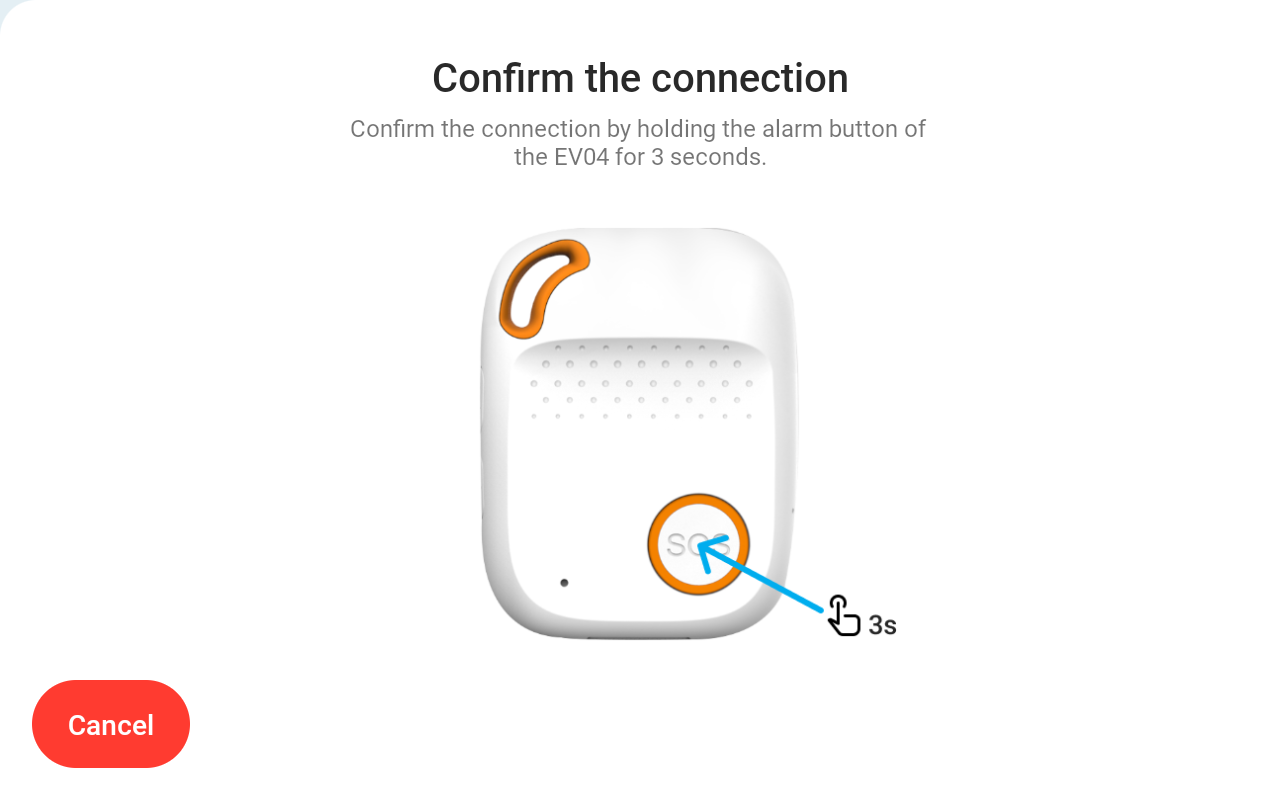
- Confirm by holding the alarm button for 3 seconds. The button says The button was linked, and the Genus shows EV04 button connected!.
Since February the confirming press also completes the pairing in a place where the button has no mobile data at that moment.
For care professionals: the buttons on the client page
Section titled “For care professionals: the buttons on the client page”Since February, the client page in the Community Portal has a section Contact buttons. It lists each button paired with the client’s Genus, with its Button name, Type and Phone number.
Click a button to open Contact button location. It shows the button’s last known position on a map, with Last known location and how long ago it was received. When no position is known, it says No location available. The map keeps refreshing while it is open.
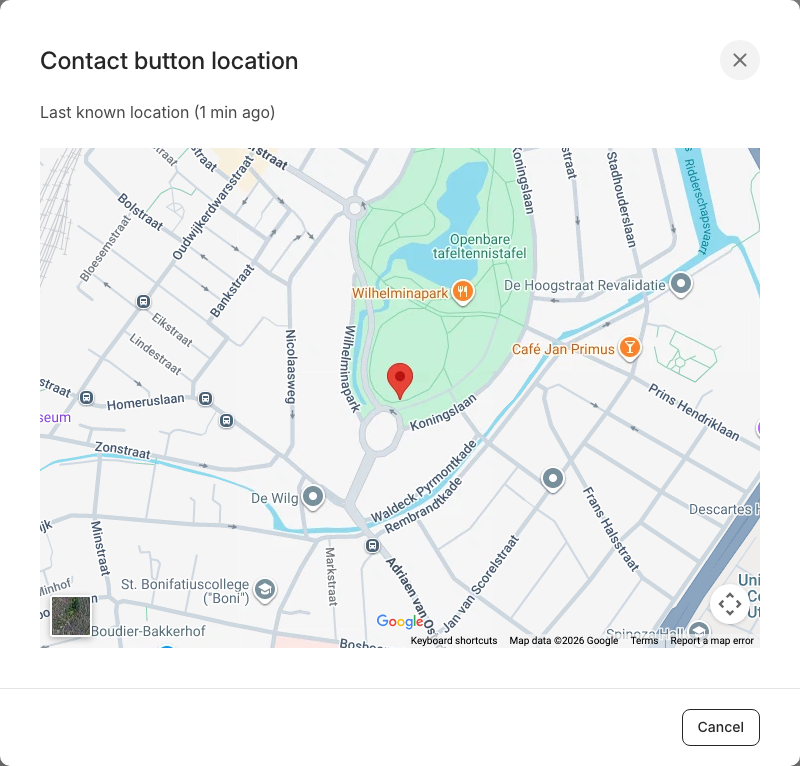
Today the buttons are listed in the client’s Connected devices card, and a click on the button opens the same map. See the client page.
On the Genus: the button’s settings
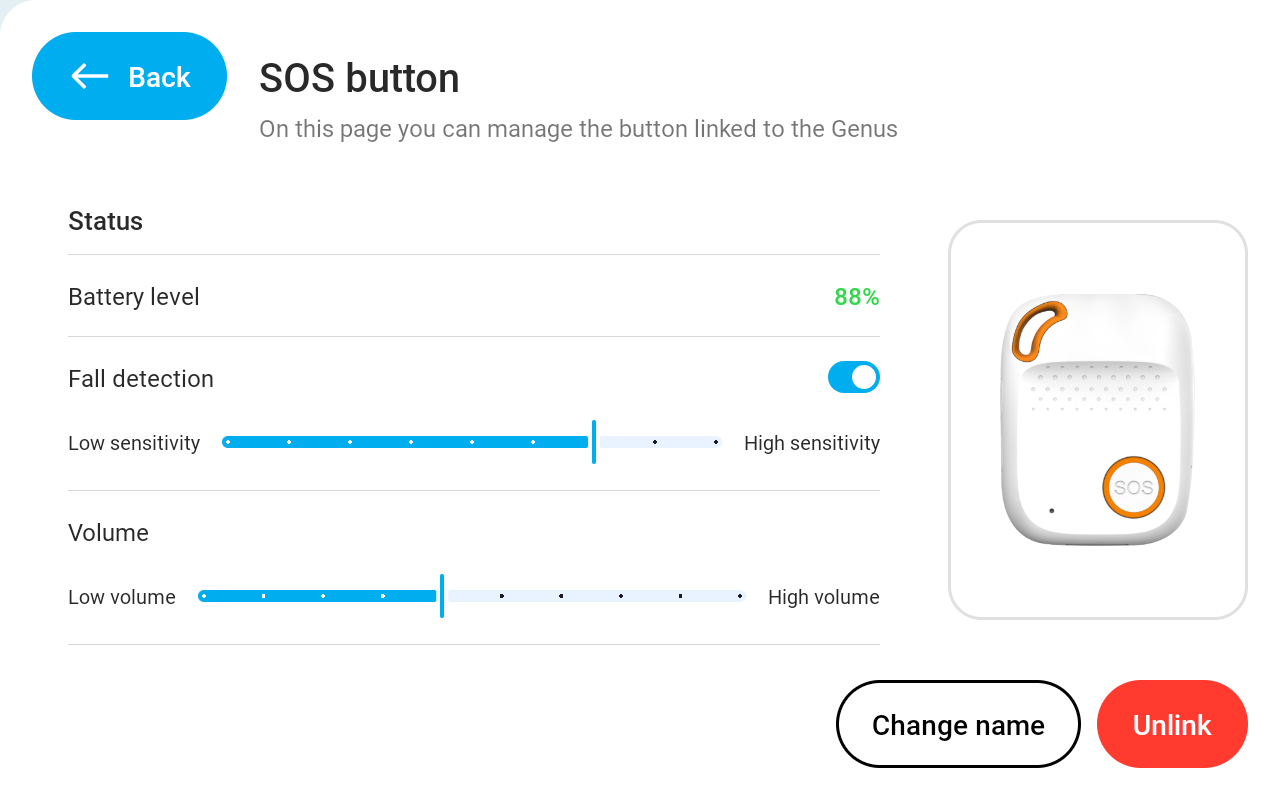
Section titled “On the Genus: the button’s settings”The settings of the button are on the client’s Genus. In February 2024 you opened the button under MENU → Connect → Buttons; today it is under Connect → Devices (sensors). Next to the Battery level, the screen now has these settings:
| Setting | What it does | Default |
|---|---|---|
| Fall detection | Lets the button raise an alarm when it detects a fall | Off |
| Sensitivity, from Low sensitivity to High sensitivity | How easily a movement counts as a fall, in nine steps | Step 7 |
| Volume, from Low volume to High volume | One slider for the button’s voice, ringtone and calls | 50 of 100 |
Tap Save. The Genus says Settings saved, it can take up to 30 minutes to sync with the button. The button picks up the change the next time it connects.
The full description of the settings is on alarm buttons.
Availability
Section titled “Availability”- The spoken messages and fall alarms work through the Genus platform, which was updated automatically in January and February 2024. Pairing without mobile data works since the end of February.
- The Community Portal showed the buttons on the client page from February, without an update on your side.
- The button’s settings came to the Genus with Genus 2.2.0 in February. The Genus updates itself.