

Air quality in the home
A pan that boils dry, a room that is never aired, a cleaning product left open: the air in a client’s home can change without anyone noticing. The Genus measures the temperature, humidity, light, sound and gases in the room where it stands. Since September 2026 the client report shows the temperature, humidity and air quality of every day.
This release puts those readings to work. The Genus learns what the air in the room is normally like and sends an alert when it suddenly gets much worse. The readings and graphs in the Genus app and the Community Portal now show their values in units. Temperature alerts close by themselves once the room is back to normal.
What’s new
- Air quality alerts reach family members with full access and the care team when the air in the client’s room suddenly gets much worse than usual. The alert closes by itself when the air has cleared.
- Family members with full access switch the alert on in the Genus app, choose how sensitive it is, and see the readings in units under Trends.
- Admins and Team Leads switch the alert on for a client in the Community Portal, under Lifestyle monitoring.
- Care professionals see the alert in the Community Portal and the Professional App. Its details show the measured level next to the usual level, with the air quality graph of that day.
- Sensor readings and graphs show temperature in °C, humidity in %, light in lux and sound in decibels.
- Temperature alerts close by themselves when the room is back within its limits, and can come more than once a day.
- Genus 4.17.0 follows the sound in the room more closely.
How air quality alerts work
Section titled “How air quality alerts work”The sensor in the Genus reacts to gases in the air: smoke from burnt food, but also cleaning spray or a scented candle. There is no fixed limit for good or bad air, because what is normal differs from room to room. So the Genus learns by itself what is usual for the room and watches for sudden rises.
- The alert. An alert is sent when the air stays clearly worse than is usual for the room. You choose how sensitive the alert is.
- One alert at a time. While an alert is open, no new one is sent.
- Closing. When the air has cleared, the alert closes by itself and is marked as solved by Genus.
Who receives the alert
Section titled “Who receives the alert”| Who | What they receive |
|---|---|
| Family members with full access | A notification from the Genus app, and the alert on Home |
| Every care organisation linked to the client | A live Alert message and the alert on the client’s page in the Community Portal, and a notification in the Professional App |
| The client | Nothing. The Genus shows no alert, so the client is not disturbed. |
The settings
Section titled “The settings”Air quality alerts are off by default for every Genus. A family member with full access can switch them on in the Genus app, and an Admin or Team Lead in the Community Portal. Both change the same setting of the Genus: whoever switches it on, the family and the care team both receive the alerts.
| Setting | Options | Default |
|---|---|---|
| Air quality | On or off | Off |
| Sensitivity | Low, Normal or High | Normal |
| Ignore small spikes | On or off | Off |
The sensitivity decides how much worse than usual the air must get before an alert is sent:
| Sensitivity | What the Genus app says |
|---|---|
| Low | Only alerts when the air gets a lot worse than usual. You will receive fewer alerts. |
| Normal | Alerts when the air gets much worse than usual. Recommended for most rooms. |
| High | Also alerts on smaller changes, so you are warned earlier. You may receive more alerts. |
Ignore small spikes is meant for alerts about harmless things, such as cleaning spray or a scented candle.
More about the readings and the alerts they raise: climate and air quality.
For family members: the Genus app
Section titled “For family members: the Genus app”Switching on air quality alerts
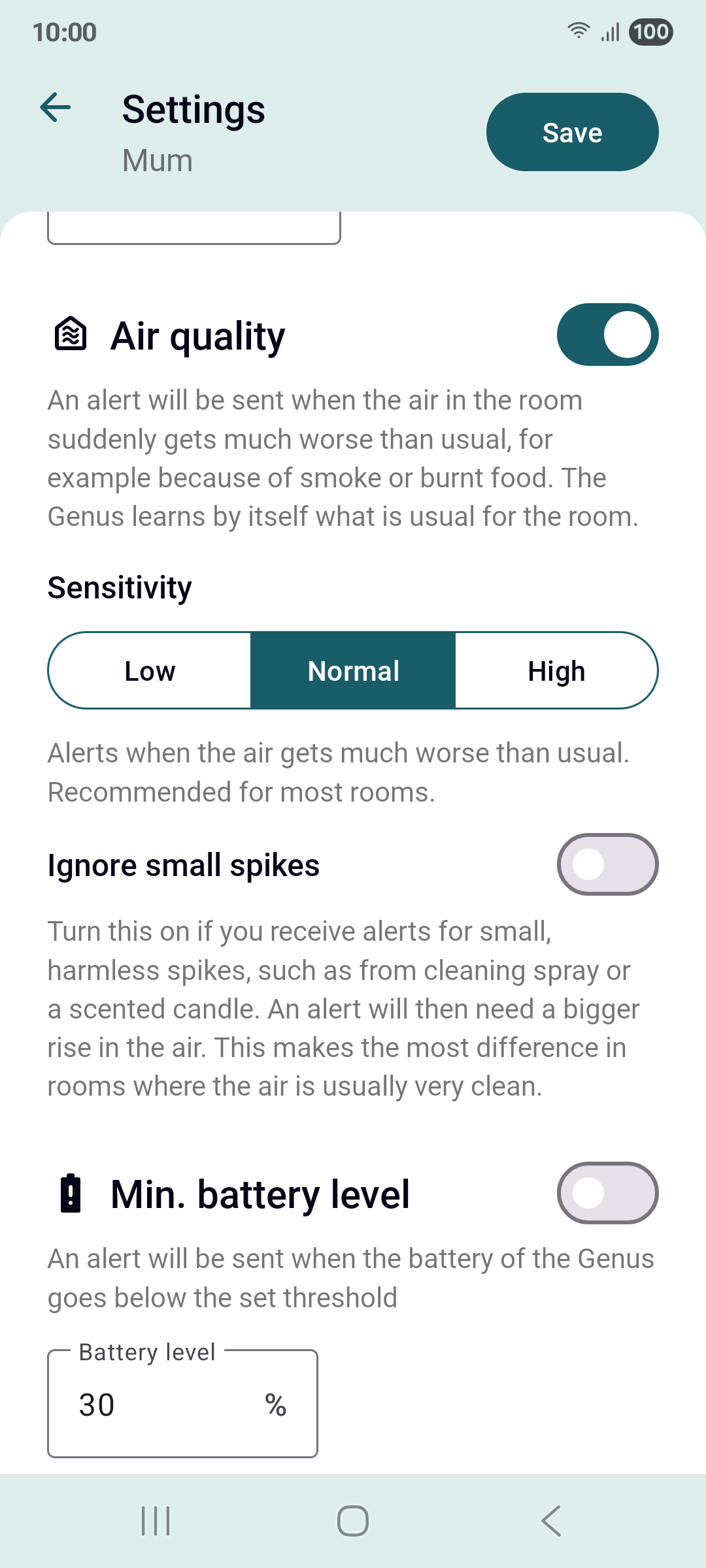
Section titled “Switching on air quality alerts”- Open your loved one’s Genus in the app and open its settings.
- In the alerts, below Max. temperature, switch on Air quality.
- Choose a Sensitivity. Normal suits most rooms.
- Switch on Ignore small spikes if you receive alerts for harmless things.
- Tap Save.
When an alert comes in
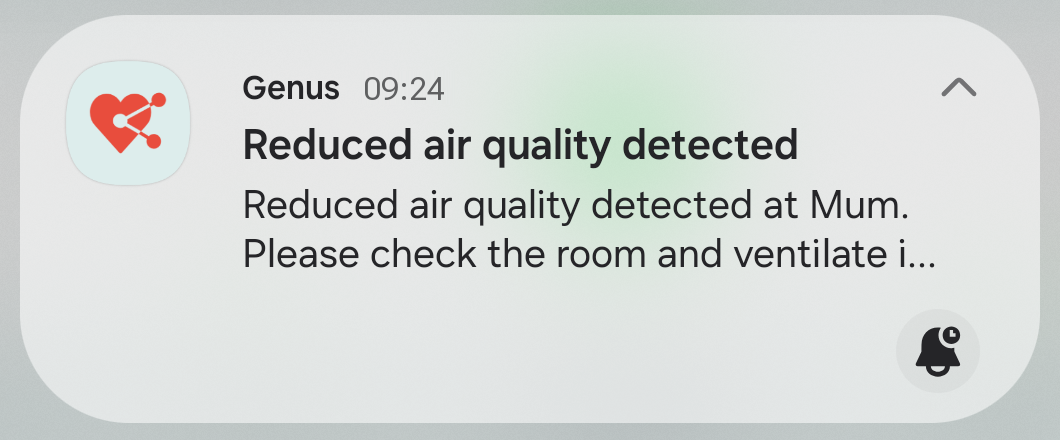
Section titled “When an alert comes in”The notification reads Reduced air quality detected, with the text Reduced air quality detected at Mum. Please check the room and ventilate if necessary. The app uses the name you gave the Genus, or the client’s name if you didn’t give it one.
The alert is also listed on Home. Tap it to open Air quality alert with the full text. Go to trends opens the air quality graph, and Solve closes the alert.
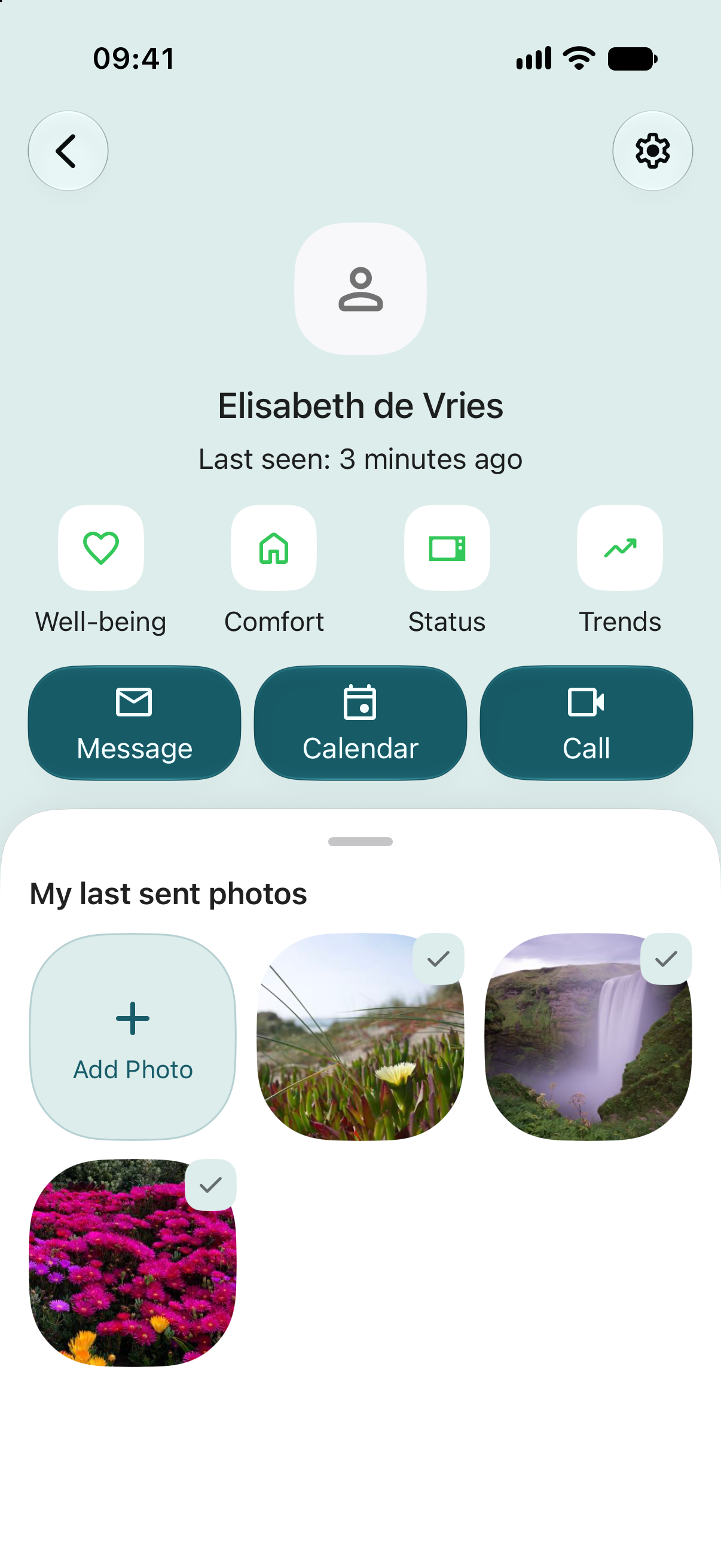
On the Genus’s page, the Comfort button changes colour while the alert is open. Tap it to go straight to the air quality graph. When the air has cleared and the alert closes by itself, you receive Alert solved: Alert ‘Reduced air quality detected’ solved by Genus.
Trends: the readings and their graphs
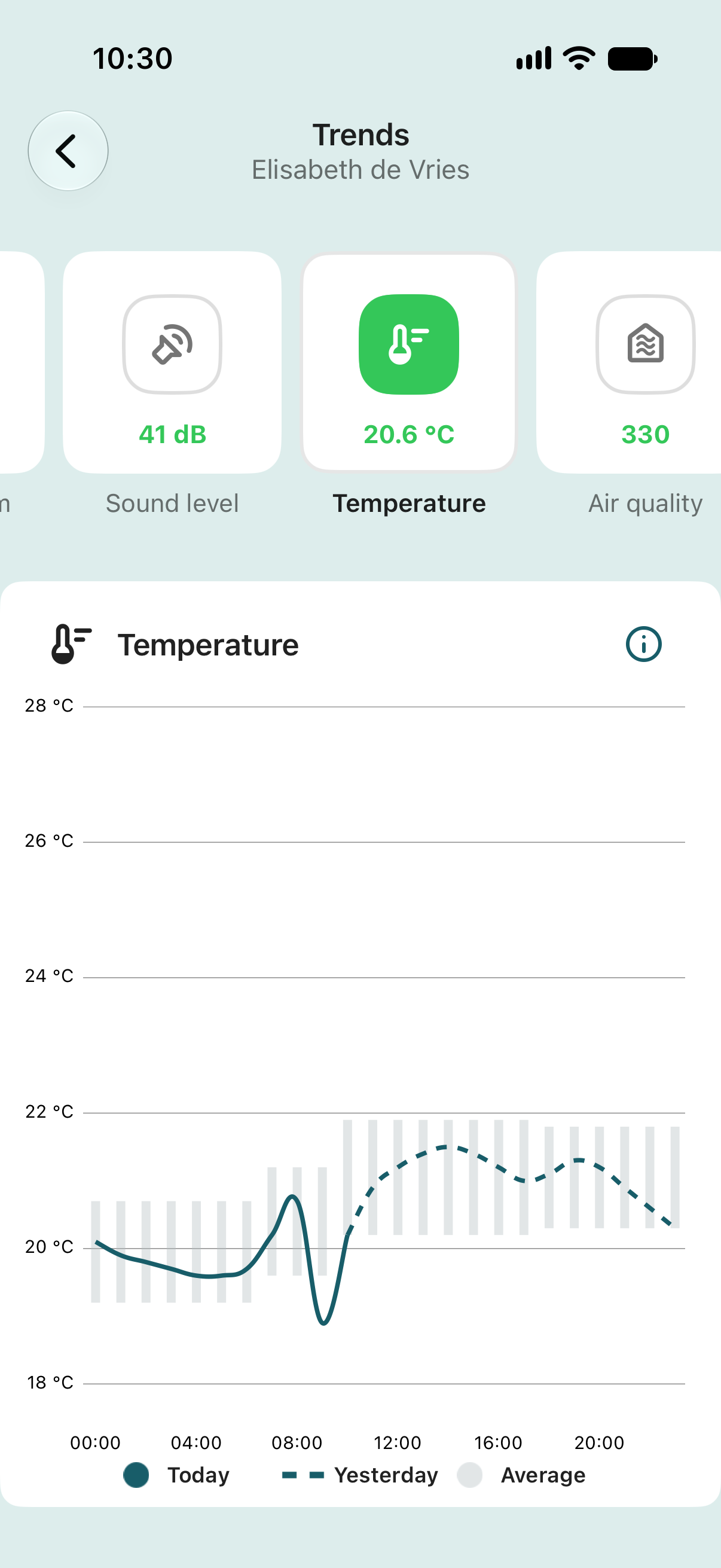
Section titled “Trends: the readings and their graphs”Tap Trends on the Genus’s page. The cards at the top show the latest readings:
- Temperature in °C, with one decimal.
- Humidity in %.
- Light in lux (lx).
- Sound level in decibels (dB), instead of a symbol.
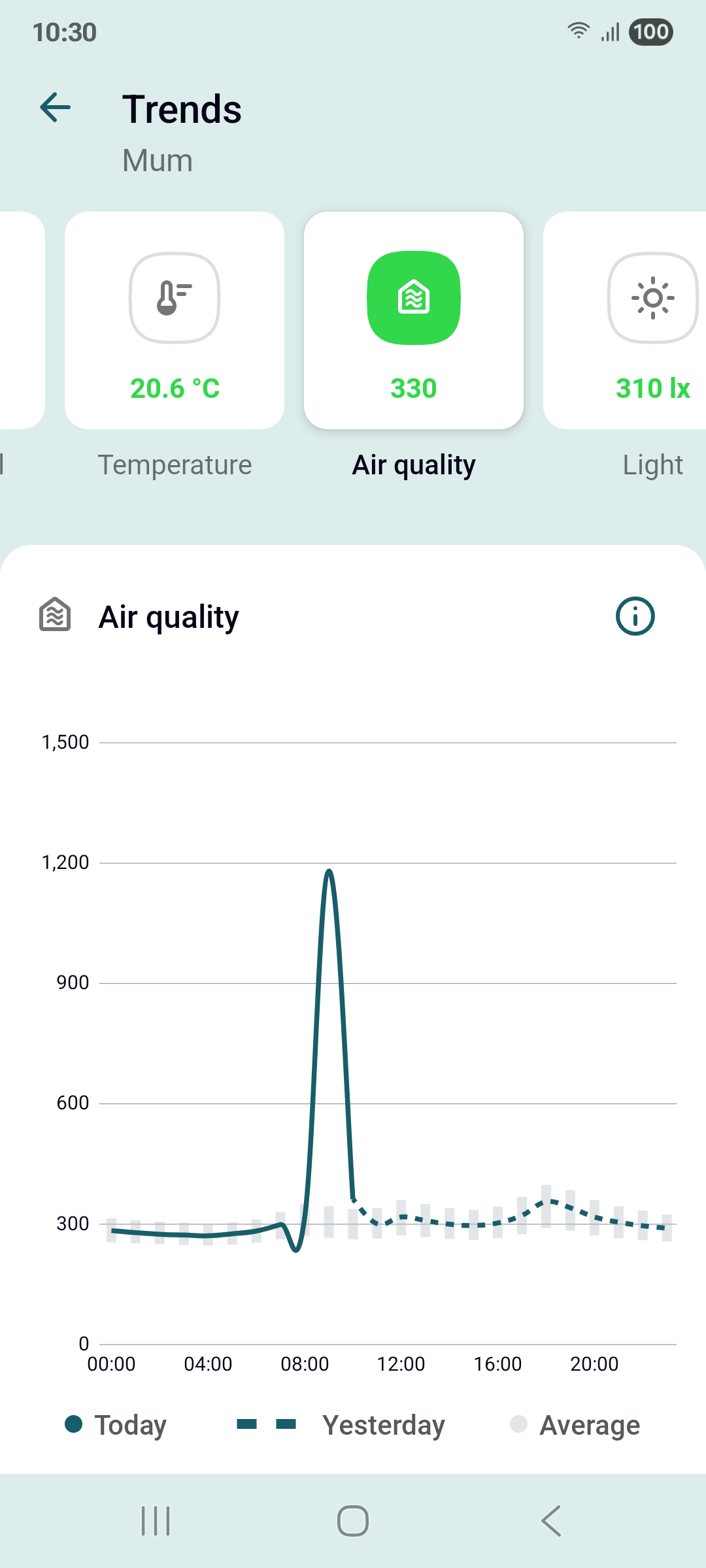
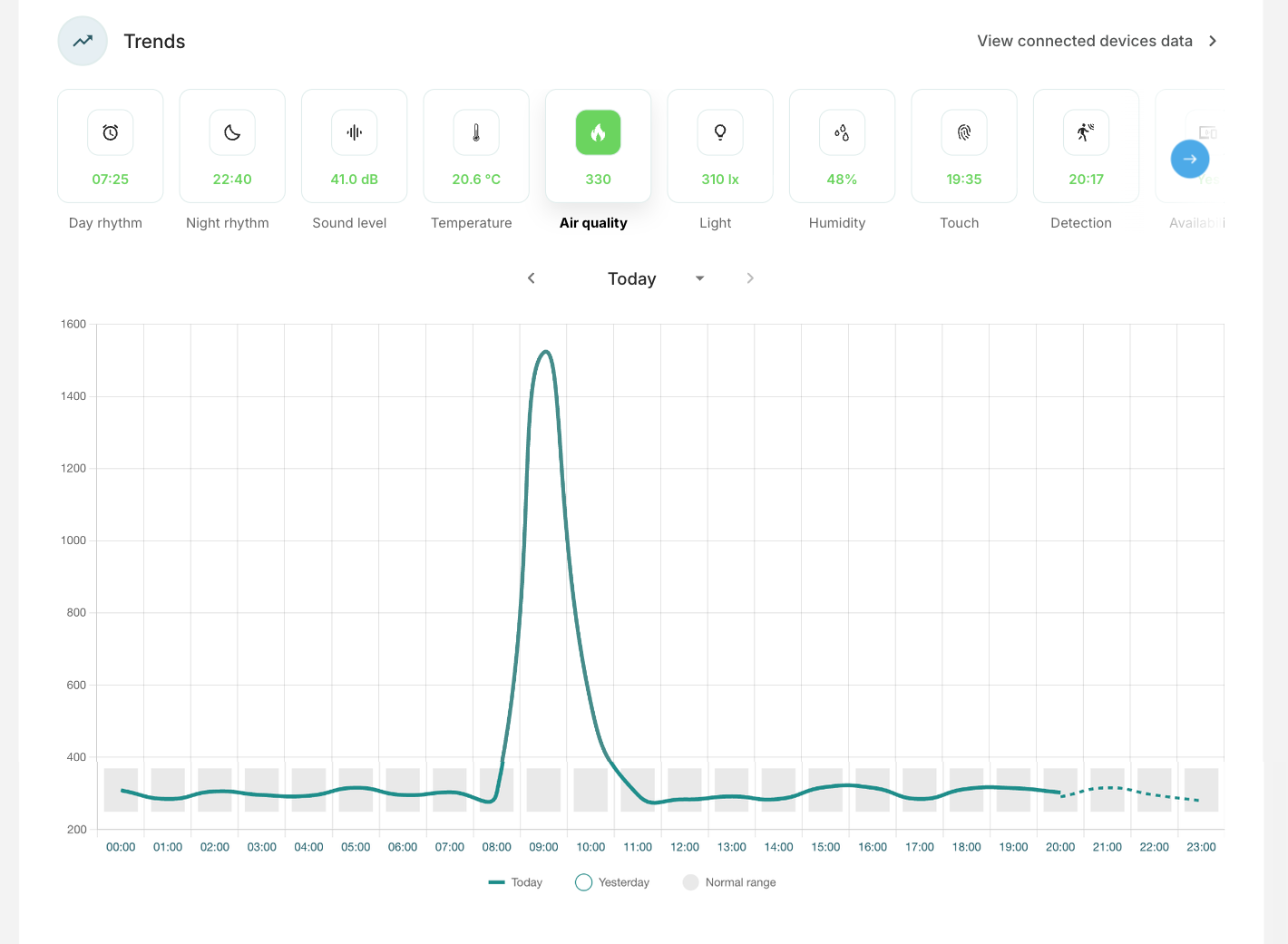
- Air quality as a number on the sensor’s own scale, without a unit. The card is highlighted while an air quality alert is open.
- Day rhythm, Night rhythm, Touch and Movement as times.
Status shows the same readings in the same units.
Tap a card to see its graph. The hourly graphs show the last 24 hours: today’s hours as a solid line and the remaining hours of yesterday as a dashed line. Bars behind the line show the normal range of each hour: what is usual in the room at that time of day.
Light uses a scale with steps of 10, 100 and 1,000 lux, so a dim evening and a sunny afternoon both fit. A dark hour runs along the bottom line, marked 0 lx.
More in sensors and insights.
For care professionals: the Community Portal
Section titled “For care professionals: the Community Portal”Receiving an air quality alert
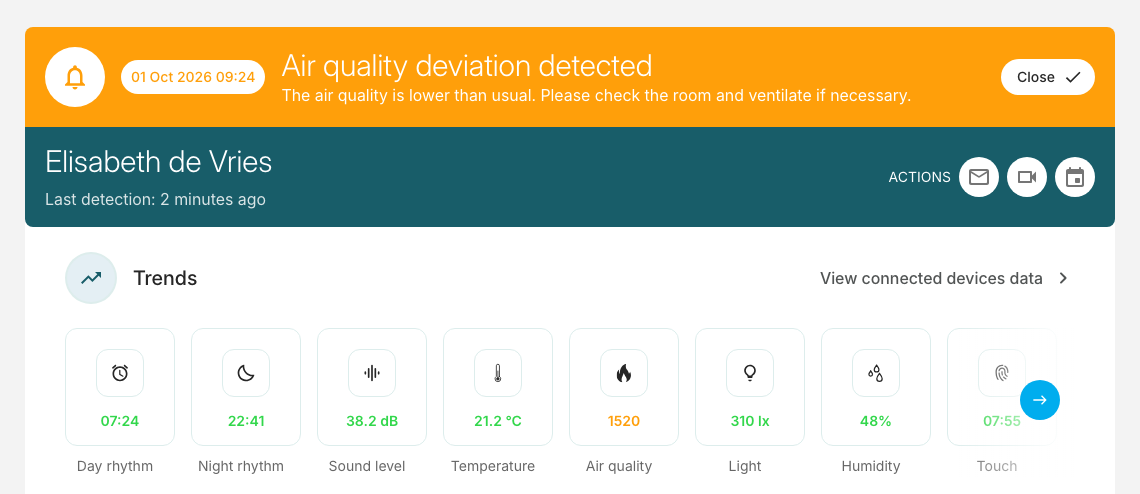
Section titled “Receiving an air quality alert”When an air quality alert is raised, the portal shows a live Alert message: Elisabeth de Vries has raised an alert.
- On the client’s page, the open alert is shown at the top: Air quality deviation detected, with The air quality is lower than usual. Please check the room and ventilate if necessary. Close marks the alert as handled.
- In the client list, the client’s alerts column shows the air quality icon.
- In Trends, the Air quality card is highlighted while the alert is open.
- In the Professional App, care professionals of the organisation receive a notification with the client’s name, and the room number if there is one, and Reduced air quality detected.
The alert details
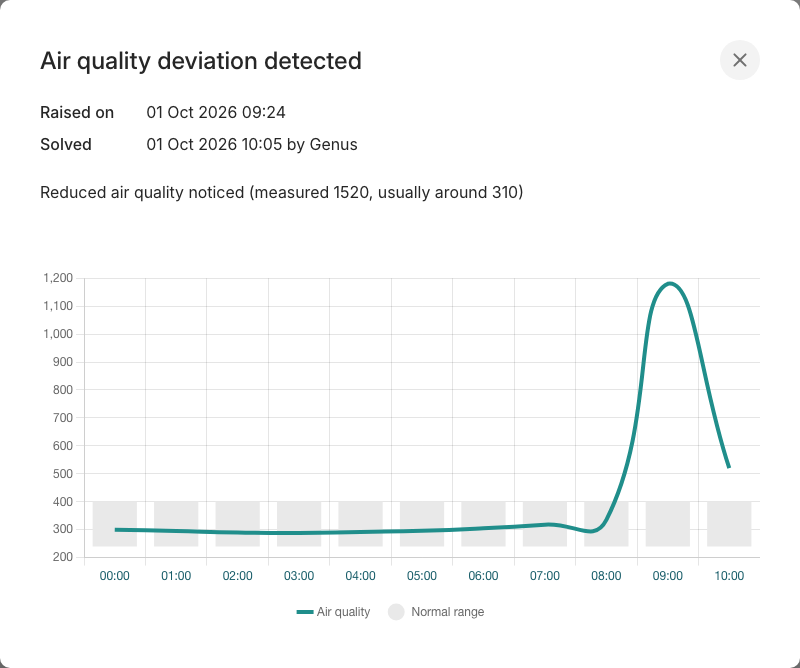
Section titled “The alert details”Under Alerts on the client’s page, click the alert to open its details. They show the level that raised the alert and the usual level of the room, for example Reduced air quality noticed (measured 1520, usually around 310). Both numbers are on the sensor’s own scale.
- The graph shows the air quality of the day the alert was raised, hour by hour, so you see how the level built up and came down.
- Solved by. When the alert has closed by itself, the details say Solved by: Genus with the time.
- Solve closes an alert that is still open.
Switching on air quality alerts for a client
Section titled “Switching on air quality alerts for a client”- Open the client and go to Lifestyle monitoring.
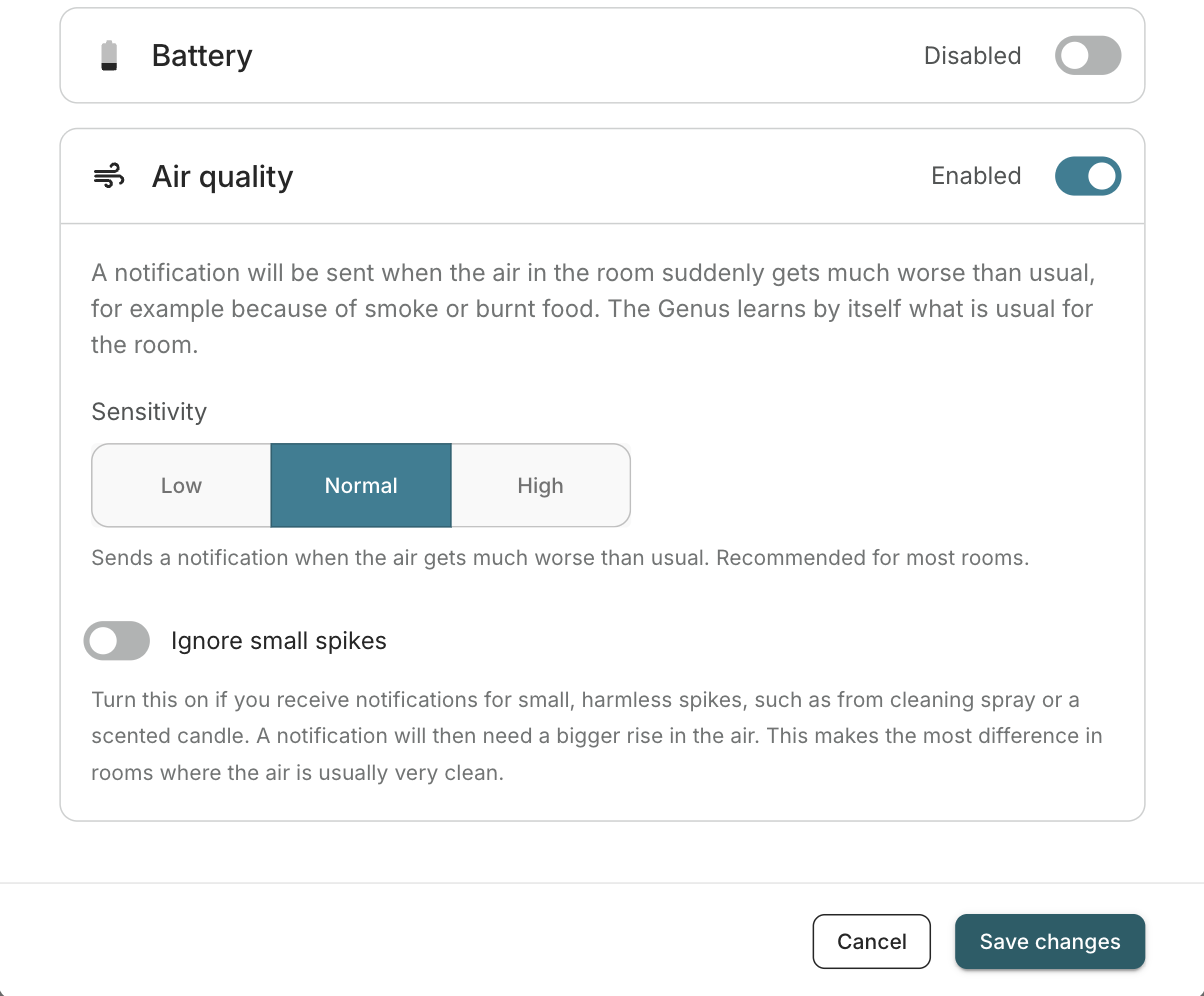
- Click Edit. Edit Genus settings opens.
- Switch the Air quality block to Enabled.
- Under Sensitivity, choose Low, Normal or High. Switch on Ignore small spikes if needed.
- Click Save changes.
Lifestyle monitoring then lists Air quality with its status and Sensitivity: Normal, or Sensitivity: Normal, small spikes are ignored. Admins and Team Leads can change this setting. Clients with Genus PAL have no Lifestyle monitoring.
Sensor graphs in Trends
Section titled “Sensor graphs in Trends”The Trends block at the top of the client’s page shows the latest readings in units: temperature in °C with one decimal, humidity in %, light in lux and the sound level in decibels instead of a loudspeaker symbol. Click a card to see its graph. By default it covers the last 24 hours, with a line for today, a line for yesterday and the Normal range for each hour. The light graph uses steps of ten, with dark hours on the bottom line, marked 0 lx.
More in sensor graphs and trends and alerts and alarms.
Temperature alerts close by themselves
Section titled “Temperature alerts close by themselves”Temperature alerts warn when the room stays too cold or too warm while the client is there. Unless someone changed them, the limits are 15 °C and 30 °C. Family members with full access set them in the Genus app, Admins and Team Leads under Lifestyle monitoring.
As before, an alert follows when the temperature stays at or below the minimum, or at or above the maximum, for a while with someone in the room. Temperature alerts come during the day and the evening, not at night. What changes:
- Closing by itself. The alert closes once the temperature is back within the limits, and is marked as solved by Genus.
- More than once a day. A new alert can follow once the previous one has closed.
- Not for a short draught. The temperature has to stay outside the limit the whole time before an alert follows. A short draught raises no alert.
- One decimal. The alert gives the temperature with one decimal, for example The temperature is too low (14.5°C).
On the Genus: the sound level
Section titled “On the Genus: the sound level”From Genus 4.17.0, the sound level in Trends follows the sound in the room more closely. Its levels are lower than those of earlier versions. For about a week after the update, the normal range of the sound level still includes the higher levels from before.
Fixes and improvements
Section titled “Fixes and improvements”- Genus settings in the Android app. If the settings of a Genus can’t be loaded, the screen closes with Failed to load Genus device settings.
Availability
Section titled “Availability”Air quality alerts are available from November 2026 for every Genus. They are not part of Genus PAL.
- The Community Portal and the Genus servers were updated automatically in November. Air quality alerts and the new temperature alert rules work with every version of the Genus.
- Genus 4.17.0 was released in November 2026. It brings the new measurement of the sound level.
- Family members get the air quality setting, the readings in units and the new graphs with the Genus app 2.6.0 for Android and iPhone, from Google Play or the App Store. Older versions of the app already show air quality alerts as notifications.
- The Professional App needs no update to show air quality alerts.