

A client's alarm and alert history that shows how each one was handled
After a call for help, the care team often wants to look back. Which team got the alarm first, when did it move on, and who went to the client? The same goes for a medicine reminder that went unanswered: the family is told first, and the care team wants to know whether it is being handled.
With this release the client page in the Community Portal answers those questions. An alarm shows each step it took through your organisation, and the alerts of your own messages appear in the history while the family still has them.
What’s new
- Care professionals open an alarm in a client’s history and see when it reached each team, who responded and when it was closed, with the name of the button or device that raised it.
- Care professionals see the alerts of their medicine reminders while they are still with the family, marked Not escalated yet, and can solve them.
- Care professionals see for every alert when it was raised and solved, and for a message alert when it reached your organisation or when it will.
- Care professionals open a message in the history and see its answer, when it was answered and the alert it raised.
- Health administrators can check afterwards how the escalation chain worked for each alarm.
For care professionals: how an alarm was handled
Section titled “For care professionals: how an alarm was handled”On the client page, go to Alarms and notifications → Alarms and click an alarm. The arrow next to Alarms opens the full history.
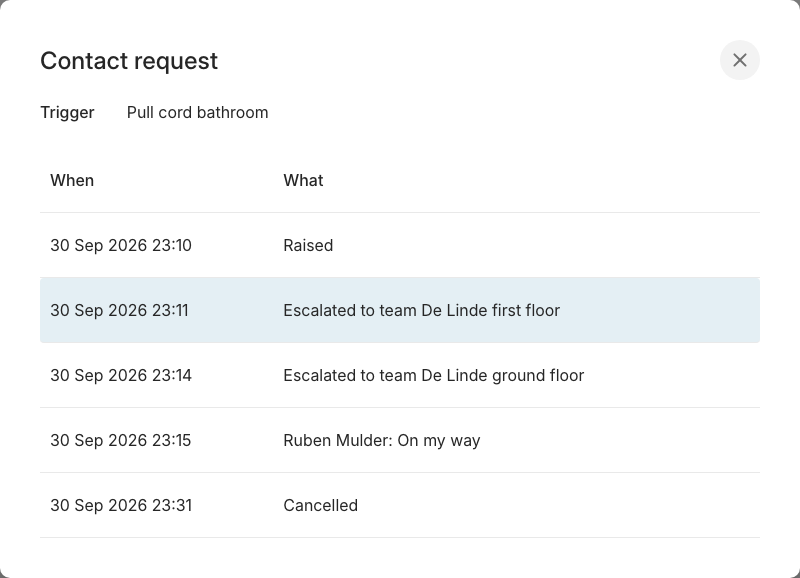
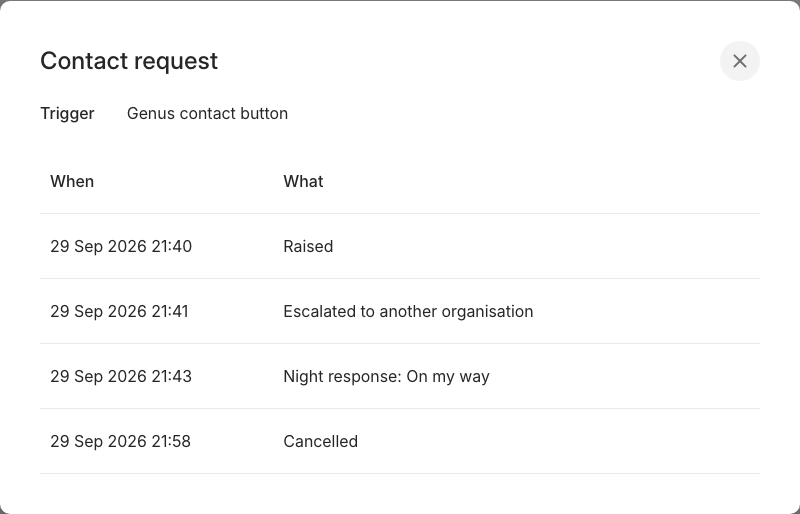
The dialog first names the Trigger: the client’s Genus button, or the name of the Genus Assist button or connected device that raised the alarm, for example Pull cord bathroom. Below it, a timeline lists what happened, oldest first, under When and What:
| Line | Meaning |
|---|---|
| Raised | The alarm was raised. |
| Escalated to team … | The alarm reached one of your teams, named, such as the client’s team or its fallback team. |
| Escalated to your whole organisation | Everyone in your organisation received the alarm. |
| Escalated to the alarm receiving centre (…) | The alarm was passed to your alarm receiving centre. |
| Escalated to another organisation | The alarm went to another care organisation linked to the same Genus. |
| A name and a response, such as Ruben Mulder: On my way | Someone responded. |
| Cancelled | The alarm was closed. |
For care professionals: alerts that are still with the family
Section titled “For care professionals: alerts that are still with the family”A medicine reminder can have Alarm settings: if the client doesn’t answer, or answers No, the family is told first and your organisation later. Until now, your organisation only saw such an alert once it reached you.
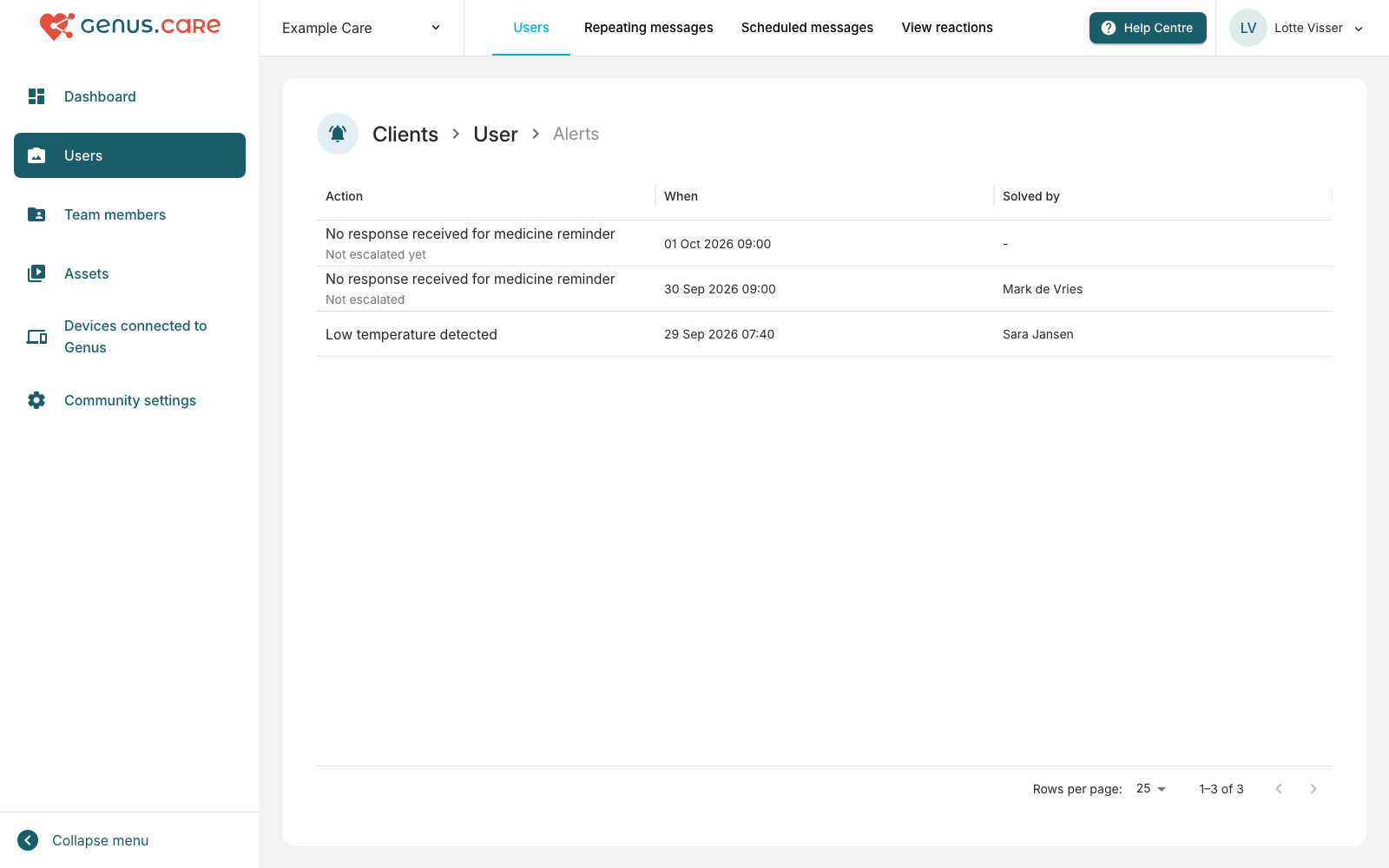
The alert history of the client page now also lists the alerts of your organisation’s messages while the family has them. Under the title of the alert you see where it stands:
- Not escalated yet: the family has the alert, and it will reach your organisation if nobody solves it first.
- Not escalated: the alert stayed with the family, because it was solved in time or the reminder doesn’t pass it on to your organisation.
You are notified only when the alert reaches your organisation, as before. If you already know what is going on, for example after a call with the client, you can Solve the alert yourself. It then doesn’t reach your organisation.
When an alert reached your organisation
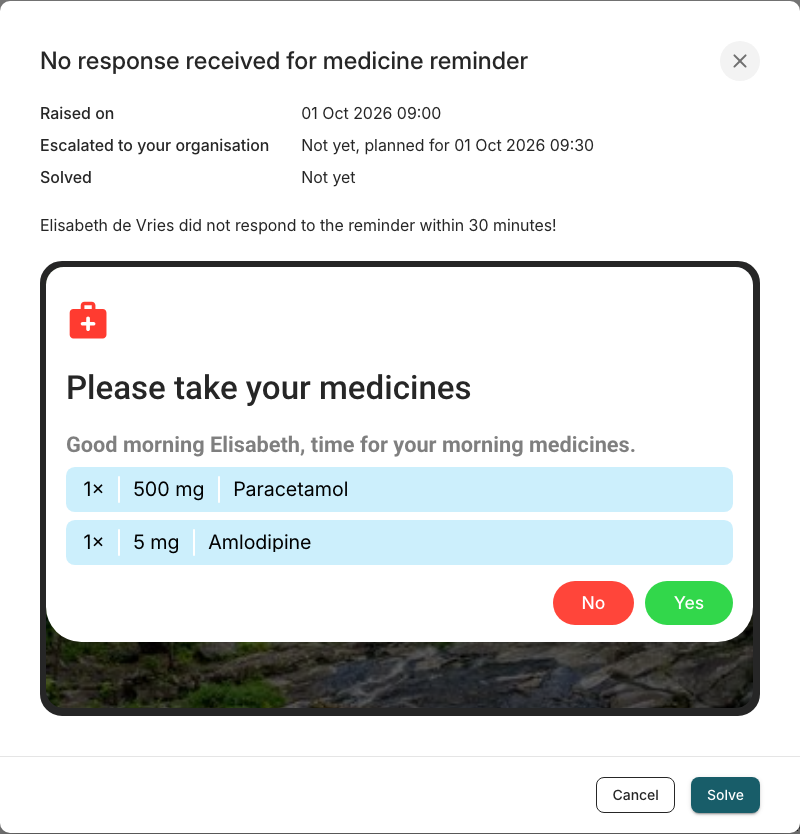
Section titled “When an alert reached your organisation”Click an alert to open its details. At the top, every alert now shows when it was Raised on and whether it is Solved, with the time and the name of whoever solved it, or Not yet.
The alerts of a message also show Escalated to your organisation:
| You see | Meaning |
|---|---|
| A date and time | When the alert reached your organisation |
| Not yet, planned for a date and time | The family has the alert. It reaches your organisation at that time if nobody solves it first. |
| No, it was solved before | Someone solved the alert before it was due to reach your organisation |
| No, this alert is for the family only | The reminder’s alarm settings don’t pass it on to your organisation |
For care professionals: the alert of a message
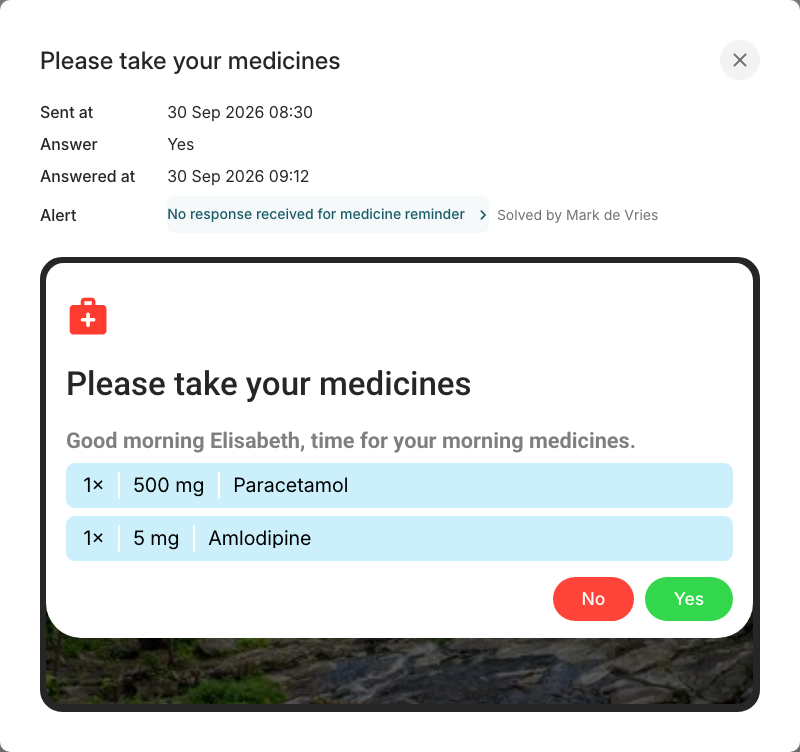
Section titled “For care professionals: the alert of a message”Click a message under Messages → Message history to open it. The dialog shows when it was Sent at, the Answer, and when the client Answered at. Below that is the message as the client saw it on the Genus.
If the message raised an alert, the line Alert names it with its status: Open, Solved by and a name, Not escalated yet or Not escalated. Click the alert to open its details.
How alarm settings on medicine reminders work is explained on messages.
For health administrators: checking the chain
Section titled “For health administrators: checking the chain”The alarm timeline shows how your escalation chain worked for each alarm: how long it stayed with the client’s team, when the fallback team and the rest of the organisation were alerted, and when someone was on the way. Use it to check the Escalate after (minutes) of your teams, and whether every team is covered by someone in the Professional App. See escalation and teams.
The alerts of medicine reminders follow the reminder’s alarm settings:
- An alert the family solves in time stays with the family. Your organisation is not notified.
- An alarm receiving centre or connected care system that receives your alerts gets a reminder’s alert when it reaches your organisation, together with your team.
Fixes and improvements
Section titled “Fixes and improvements”- The trigger of an alarm. The Trigger column of the alarm history shows the name of the Genus Assist button or connected device that raised the alarm.
- A message in the history shows its medicines and the sender’s photo, as the client saw it.
- The alert of an unanswered message names the minutes the client had to answer.
Availability
Section titled “Availability”The changes are part of the Community Portal and the Genus servers, and were released in November 2026. No app update is needed. The Professional App and the Genus app show alarms and alerts as before.