

Genus update: winter 2025
This winter care organisations began to livestream to their clients, and family members could send a message with answer buttons from the Genus app (livestreams and messages from the family). Distributors could see much more about each Genus in the Business Portal, set up hidden and enterprise Wi-Fi networks centrally and rely on updates over a busy network (managing Genus devices remotely). This page collects everything else that changed from January to March.
The Genus
Section titled “The Genus”My Day: a first agenda on the Genus. Since January, the menu of the Genus can show a My Day button. It opens Your schedule for today: the day’s appointments with their time, title and description, scrolled to the next one. Tapping an appointment shows its details.
- Reminders. Ten minutes before an appointment, a reminder appears with a clock, the time and the title. Since Genus 3.6.1 a sound plays with it. OK closes it; otherwise it disappears when the appointment ends.
- Where the appointments came from. In this first version, they came from an online calendar that Genus linked to the client’s Genus. The Genus received the day’s appointments once a day, early in the morning.
- Only when there is something to show. Since Genus 3.7.0, the button appears once the Genus has received its first appointment. A Genus without a calendar keeps its menu as it was.
My Day grew from here: appointments from Nedap ONS followed in April (Nedap ONS on the Genus), reminders read aloud in September (the day on the Genus), and appointments from the care team and the family in 2026 (one calendar for the client, the family and the care team). See My Day and appointments.
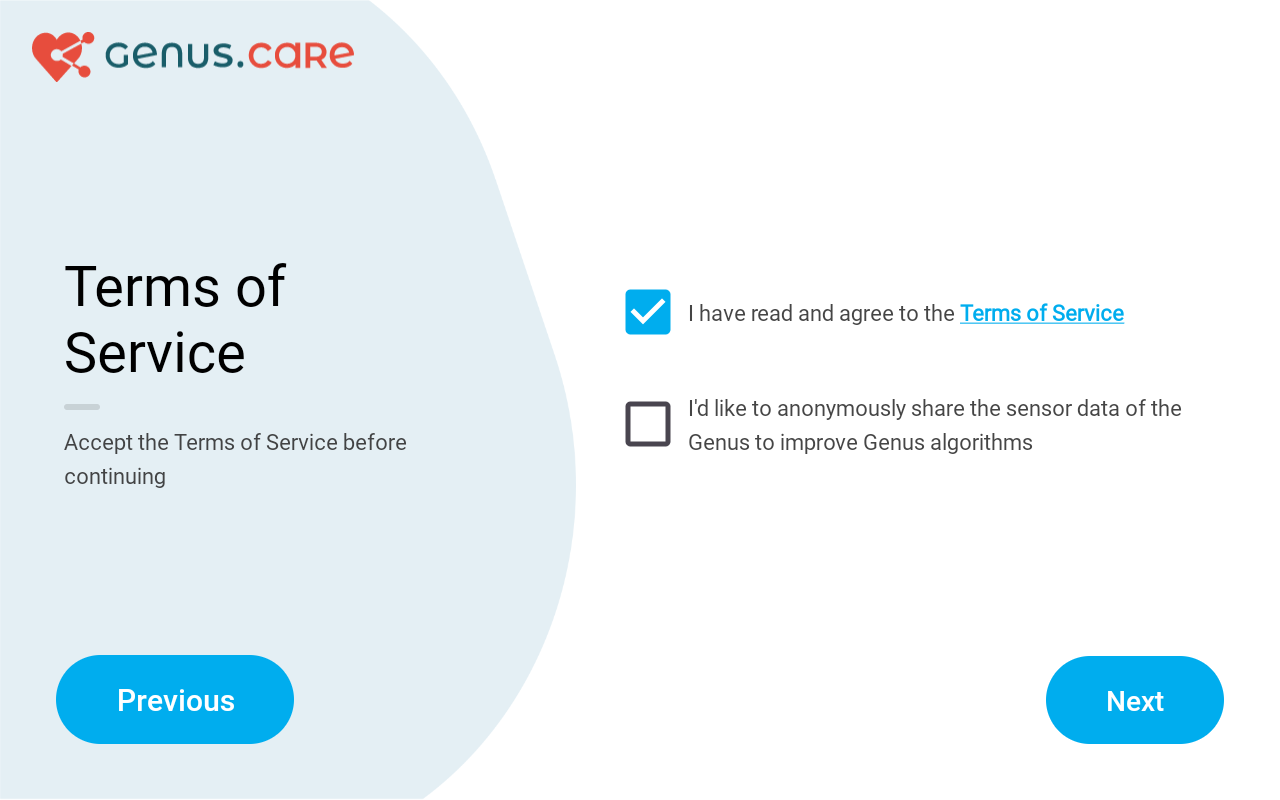
Terms of Service when a Genus is set up. Since Genus 3.10.0 (March), setting up a Genus by hand has a Terms of Service step, after the update check and before the licence code.
- Required. I have read and agree to the Terms of Service must be ticked before Next works. Tap the bold words Terms of Service to read them. Since Genus 3.10.1 they appear in Dutch on a Genus set to Dutch, and in English otherwise.
- Optional. I’d like to anonymously share the sensor data of the Genus to improve Genus algorithms is ticked by default and can be unticked.
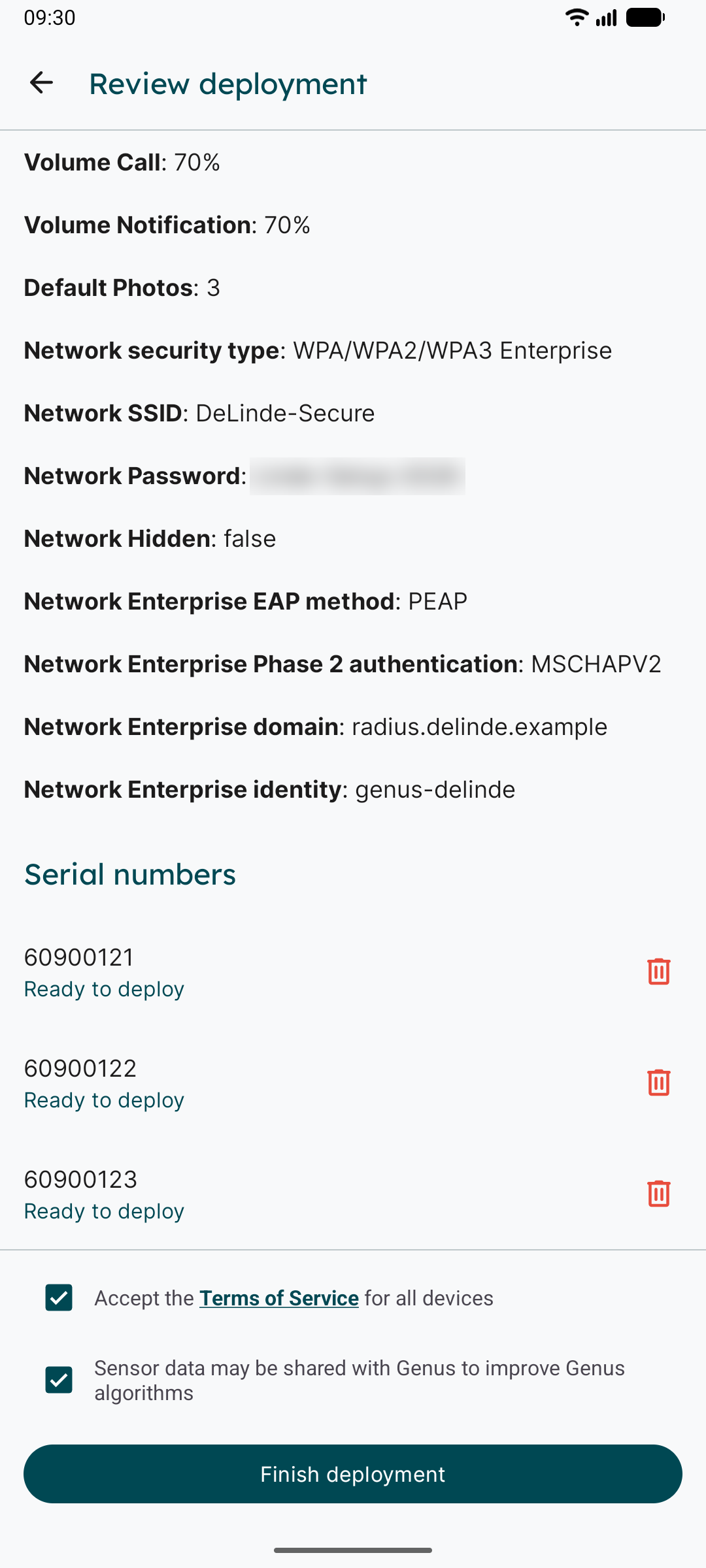
- In the Deployer app. For a Genus that sets itself up, the installer makes both choices once for all scanned devices, on Review deployment: Accept the Terms of Service for all devices must be ticked before Finish deployment, and Sensor data may be shared with Genus to improve Genus algorithms is ticked by default. Transferring a Genus asks the same. The Genus receives the choices with its deployment and asks nothing.
See setting up a Genus and the Deployer app.
The client decides whether the care team sees sensor data. Since Genus 3.10.1 (March), a client whose Genus is connected to a care organisation can stop sharing the Genus’s sensor data with it.
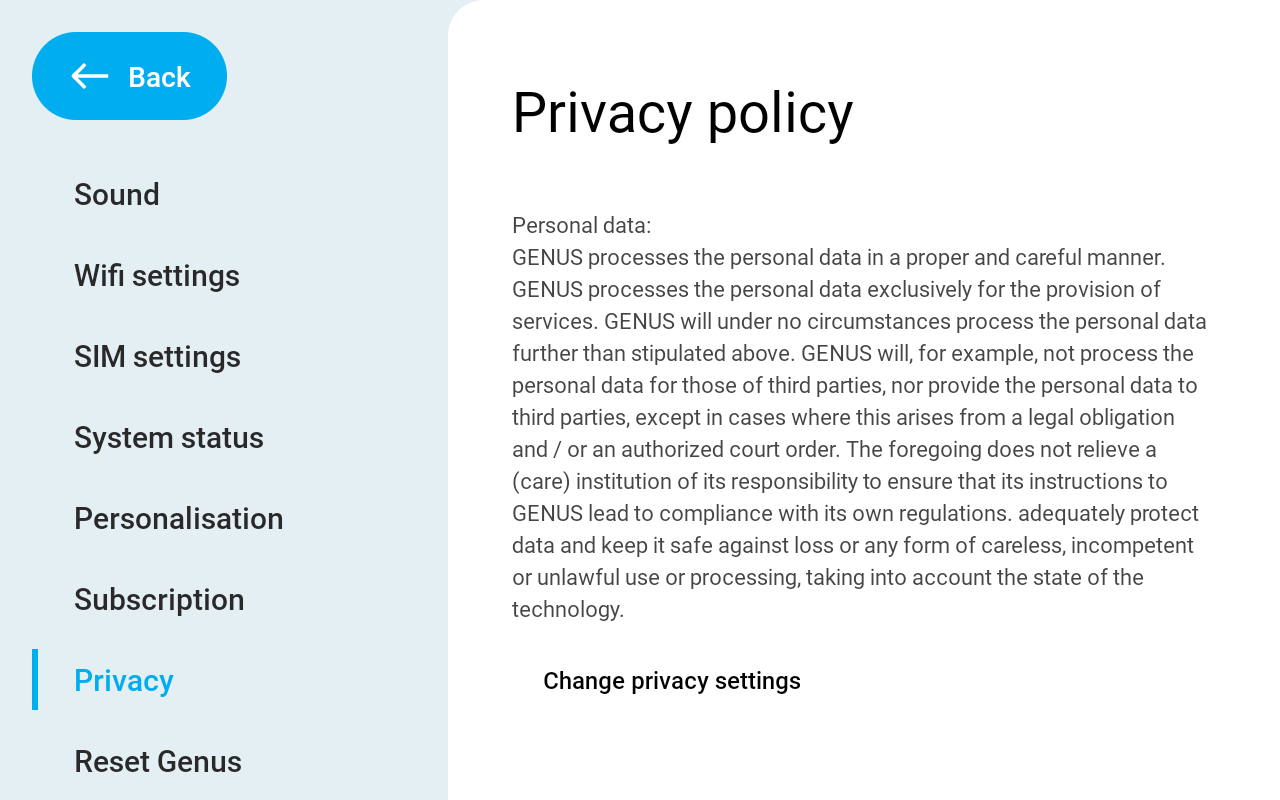
- On the Genus. Under MENU → Settings → Privacy, tap Change privacy settings. The Genus asks Are you sure? and explains that care professionals will no longer see the sensor data, which might hinder their ability to help. Opt out confirms. Allow sharing sensor data with community turns sharing back on.
- On by default. Every Genus shares its sensor data with its care organisation until the client opts out.
- In the Community Portal. After an opt-out, the Trends on the client’s page say This user has not given permission to share sensor data with the community, so we cannot display the data.
- A separate choice. This has nothing to do with the anonymous sharing at setup, which only concerns improving Genus.
See privacy choices for the client and sensor data and the care team.
The night screen in the evening. A Genus with a night screen schedule stays dark until the morning. Someone moving in the room in the late evening does not end the night (Genus 3.8.1, February). See how the night ends.
Updates over the eSIM. Since February, a Genus that is connected through its eSIM also downloads updates, instead of waiting for Wi-Fi. This is described in managing Genus devices remotely.
Community Portal
Section titled “Community Portal”The Community Portal in Spanish and Portuguese. Since January, the Community Portal is available in Spanish and Portuguese, next to Dutch and English. Each person chooses their language on their profile page, under Choose language. The video call page that opens in the browser follows the language of the browser, and since February it speaks Spanish and Portuguese as well. See supported languages.
Clearer texts. In January the English texts of the Community Portal were revised:
- Pending messages are now Scheduled messages, and escalation times Escalation handover times.
- Alerts say what was noticed, such as Day start deviation detected or Genus went offline.
- The switch for reading a message aloud is now Read message out loud.
See messages.
Genus app
Section titled “Genus app”The Genus app in Spanish. Since January the Genus app speaks Spanish, in version 2.2.9 for Android and 2.1.4 for iPhone. Like the other languages, it follows the language of the phone. See supported languages.
Faster photos on iPhone. In the Genus app 2.1.5 for iPhone (February):
- Quicker loading. The list of photos you sent to a Genus loads faster and scrolls smoothly.
- Smooth cropping. Preparing and cropping a photo goes smoothly, and the send button shows that it is busy.
- The photos sheet of a Genus now opens just below the buttons.
See sending a photo.
Business Portal and deployment
Section titled “Business Portal and deployment”A data bundle from the start. Since March, the Add subscription dialog has a 4G data bundle switch, so a new subscription can include mobile data from the start. New subscriptions are added by Admins of a distributor or reseller.
- In the list, subscriptions with a data bundle are marked 4G.
- On the subscription page, the switch that was called Allow eSIM use is now called eSIM data bundle.
See subscriptions and licences.
Devices and integrations
Section titled “Devices and integrations”Activating UMO in one go. Since March, a care organisation can switch on its UMO connection to an alarm receiving centre and choose it as the active connection in the same save. See alarm receiving centres.
Platform and security
Section titled “Platform and security”- Ready for Android 15. The Genus app 2.3.0 for Android (March) is built for Android 15 and uses the whole screen, up to the edges, as Android 15 expects.
- Kept up to date. In February and March, the Business Portal, the Deployer app and the Genus app for Android and iPhone moved to current versions of the software they are built on.
- Smaller fixes. The Genus app for iPhone is more stable (2.1.6, February). Since March, a reseller receives subscription codes by e-mail only for new subscriptions, not again when a deployment is repeated.
Availability
Section titled “Availability”- The Community Portal, the Business Portal and the platform were updated automatically.
- The Genus updates itself. Genus 3.6.0 and 3.6.1 (January) brought My Day and its reminder sound, and Genus 3.7.0 the rule that the My Day button appears with the first appointment. Genus 3.8.1 (February) brought the night screen that stays dark in the evening. Genus 3.10.0 (March) brought the Terms of Service and Genus 3.10.1 the Dutch terms and the choice over sharing sensor data. Genus 3.6.1, 3.7.0, 3.9.0 and 3.10.0 also belong to managing Genus devices remotely, and Genus 3.8.0 (February) to livestreams. Genus 3.7.1, 3.9.1 and 3.10.2 contained only internal improvements and fixes.
- Family members get the changes by updating the Genus app from Google Play or the App Store: version 2.2.9 for Android and 2.1.4 for iPhone in January, and 2.1.5 and 2.1.6 for iPhone in February. Version 2.3.0 for Android and versions 2.2.0 and 2.2.1 for iPhone (March) are described in livestreams and messages from the family.
- Installers need the Deployer app 1.3.0 (March) to accept the Terms of Service for all devices.