

Genus update: spring 2025
This spring the Genus learned to work with sensors in the home, and Genus Routines in the Community Portal began to turn what those sensors notice into alarms and alerts (sensors in the home and Genus Routines). Appointments from Nedap ONS reached My Day on the Genus from April (Nedap ONS on the Genus), and in June video calls with the Genus got noise cancellation (clearer calls). This page collects everything else that changed from April to June.
The Genus
Section titled “The Genus”A low battery during a call. The Genus is meant to stay on its power adapter. When it runs on its battery and the level gets low, it switches itself off, but not in the middle of a video or voice call: the call goes on until the battery is almost empty (Genus 3.10.5, June). See power and battery.
Switching Wi-Fi and mobile data back on. Since Genus 3.10.4 (May):
- Wifi settings. When Wi-Fi is switched off, MENU → Settings → Wifi settings shows a Turn on wifi button.
- SIM settings. MENU → Settings → SIM settings says whether mobile data is on (Mobile data: Enabled or Disabled), with Enable and Disable to change it. While the Genus switches between the eSIM and the SIM card, a progress indicator shows that it is busy.
See internet: Wi-Fi, ethernet and mobile.
Online calendars reach My Day within the hour. Since June, an appointment added or moved in a linked online calendar during the day reaches My Day on the Genus within the hour. The same change for Nedap ONS is described in Nedap ONS on the Genus. See My Day and appointments.
Community Portal
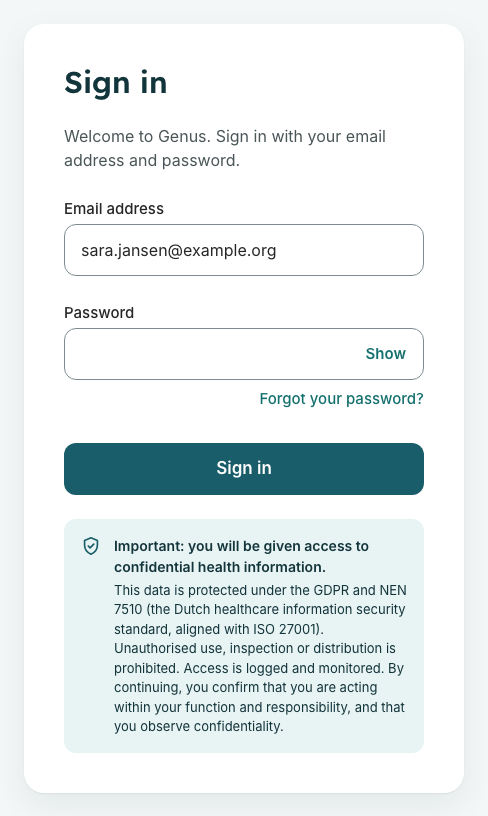
Section titled “Community Portal”A confidentiality notice at sign-in. Since April, the sign-in page of the Community Portal shows a notice below the password field: Important: you will be given access to confidential health information. It appears in English and Dutch.
- Protected data. The data falls under the GDPR and NEN 7510, the Dutch standard for information security in healthcare.
- What it says. Unauthorised use is prohibited and access is logged. By signing in, staff confirm that they act within their function and observe confidentiality.
See a confidentiality notice before you sign in.
Team members are added by the care organisation. Since May, a health administrator of the care organisation adds every team member in the Community Portal. Distributors, resellers and customers no longer create these accounts from the Business Portal. The organisation responsible for the client data thus decides who can see it. See adding a team member.
Only your first name on the Genus. Since May, a message from a care professional shows only their first name on the Genus. See how a message appears.
Genus app
Section titled “Genus app”Buttons that fit their text. Since the Genus app 2.3.1 for Android (April), the text on a button shrinks to fit on one line, so a long translation is no longer cut off.
Business Portal and deployment
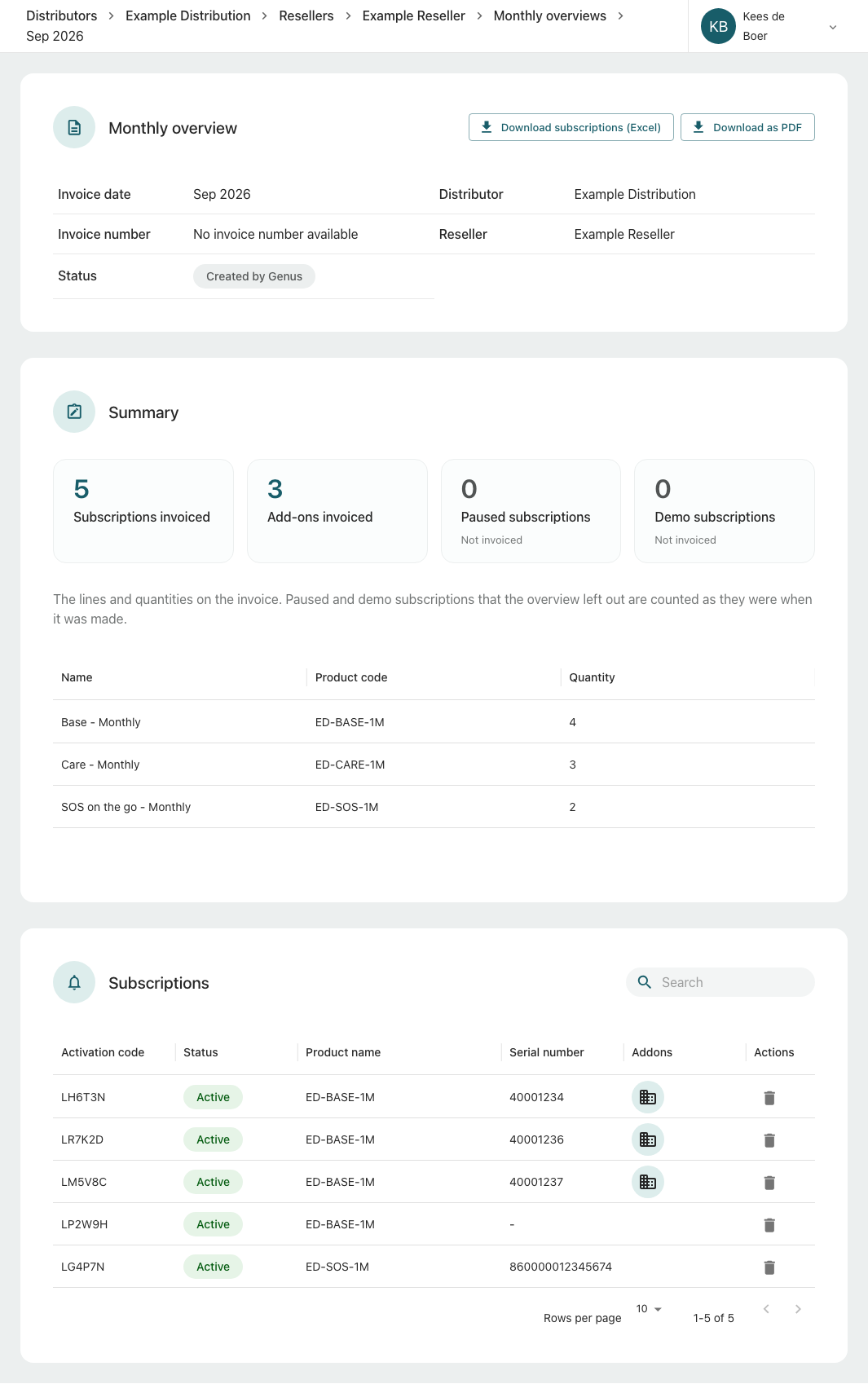
Section titled “Business Portal and deployment”Monthly overviews. Since April, the page of a distributor, a reseller or a customer in the Business Portal has a Monthly overviews block. On the first day of each month, an overview of the previous month is made: from Genus to each distributor, from the distributor to each reseller and from the reseller to each customer.
- What it lists. The subscriptions to be invoiced for that month, with their activation code, status, product, the serial number of the Genus and any add-ons. Demo subscriptions are never included.
- Downloading. Download as PDF and Download as Excel file save the overview.
- Adjusting. Admins of the distributor or reseller that issues an overview can remove a subscription or an add-on from it.
See monthly overviews and invoicing.
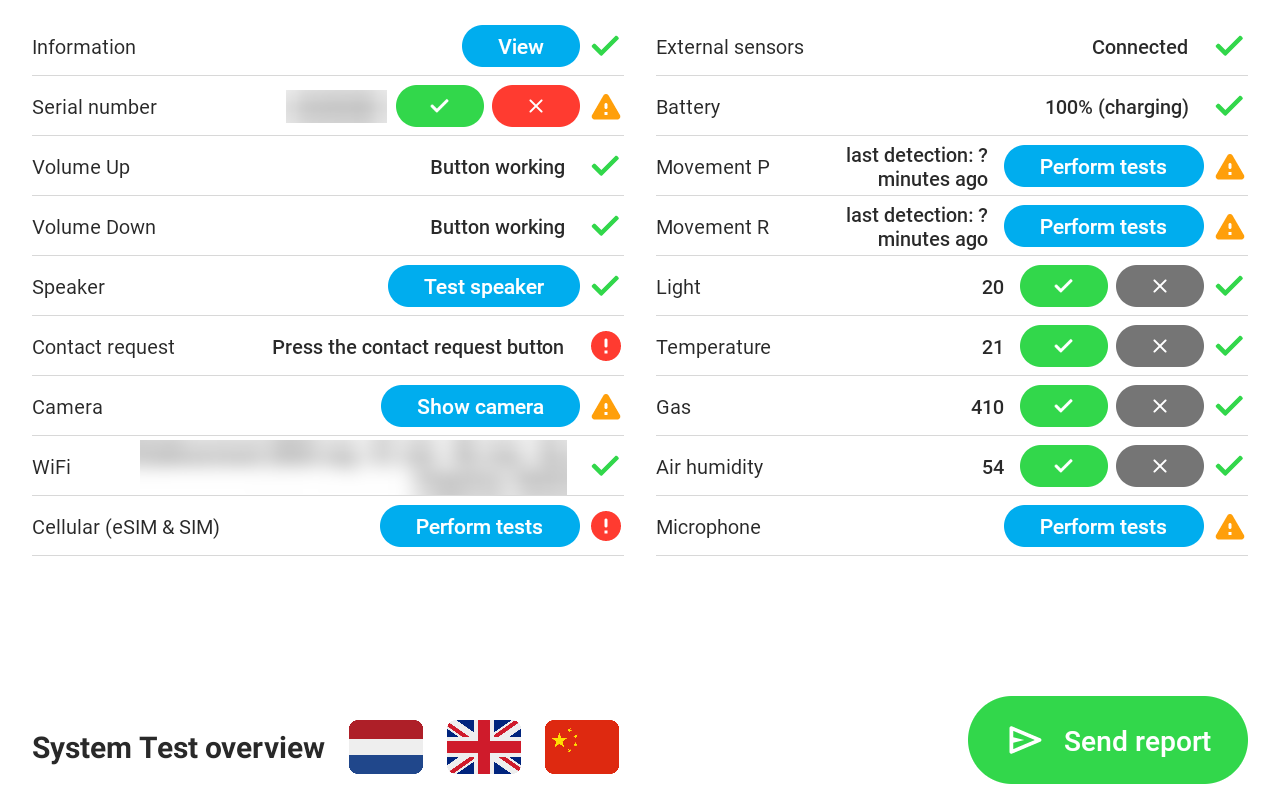
A more precise system test. Installers run the system test after setting up a Genus.
- Mobile network. Since Genus 3.10.4 (May), the mobile network checks open in their own window, Cellular (eSIM & SIM). The eSIM and the SIM card are tested separately. For the SIM card, the tester picks the top or the bottom position, because the SIM tray can hold the card either way.
- Serial number. Since Genus 3.10.5 (June), the tester confirms whether the serial number shown is correct, as for the sensor readings.
See the system test.
Platform and security
Section titled “Platform and security”- Kept up to date. In June the services behind Genus and the Business Portal moved to current versions of the software they are built on.
- Smaller fixes. The microphone test in the system test plays the recording back clearly (Genus 3.10.3, May). The Genus app for Android is more stable (2.3.1, April).
Availability
Section titled “Availability”- The Community Portal, the Business Portal and the platform were updated automatically.
- The Genus updates itself. Genus 3.10.3 (May) fixed the microphone test, Genus 3.10.4 (May) brought the Wi-Fi and SIM settings and the new mobile network test, and Genus 3.10.5 (June) the calls on a low battery and the serial number check. Genus 4.0.0 (June) brought sensors and Genus Routines and noise cancellation, described in sensors in the home and Genus Routines and clearer calls.
- Family members get the changes by updating the Genus app from Google Play or the App Store. Version 2.3.1 for Android (April) brought the fitting buttons and stability improvements. Versions 2.3.2, 2.3.3 and 2.3.4 for Android and 2.2.2 for iPhone (April and May) brought routine alerts, described in sensors in the home and Genus Routines.