

“How are you feeling?”
Restlessness and tension often build up quietly: a client who lives alone rarely calls to say she feels anxious. By the time someone notices, a difficult morning may have become a difficult week. A short question with one-tap answers, asked at the same moment every day, helps the care team notice in time.
With this release a care professional can send a client a question about how they feel, with four fixed answers. The client answers on the Genus with one tap, and an answer that signals stress raises an alert for the care team. Nobody has to look through the answers to find the one that matters.
What’s new
- Clients answer a question such as How are you feeling? on the Genus with one tap: Relaxed, Restless, Tense or Panic.
- Care professionals choose the new type of reply Stress level for a question in the Community Portal, sent once or on a schedule.
- Care professionals get an alert when the client answers Restless, Tense or Panic. Relaxed raises no alert.
- Family members with full access get the same alert in the Genus app and can call the Genus from it.
For care professionals: asking the question
Section titled “For care professionals: asking the question”The question is a message from the Community Portal. You write it in your own words; only the four answers are fixed.
- Open Send message for one client, or for several clients at once.
- Choose the message type Question and, under Type of reply, choose Stress level.
- Fill in the Subject of message, for example How are you feeling?, and if you like a Message body.
- Check the Example on the right. It shows the four answers as the client will see them.
- Send the message.
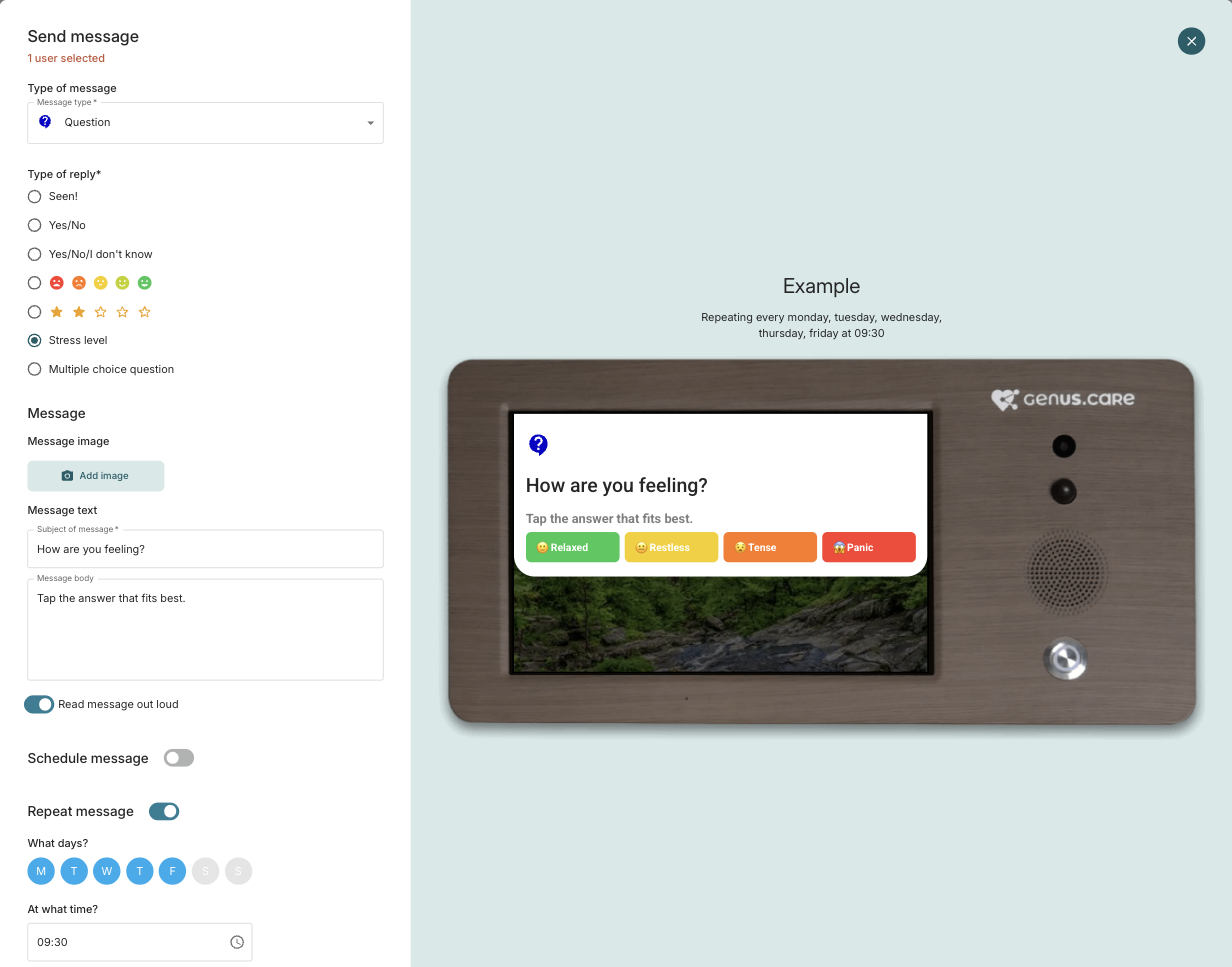
You decide when the question is asked. Send it straight away or plan it with Schedule message. To ask at the same moment every day, switch on Repeat message and choose the days and the time, such as every day at 09:30. Each repeat is a new question with its own answer.
How to send, schedule and repeat messages today is described on messages.
On the Genus: one tap to answer
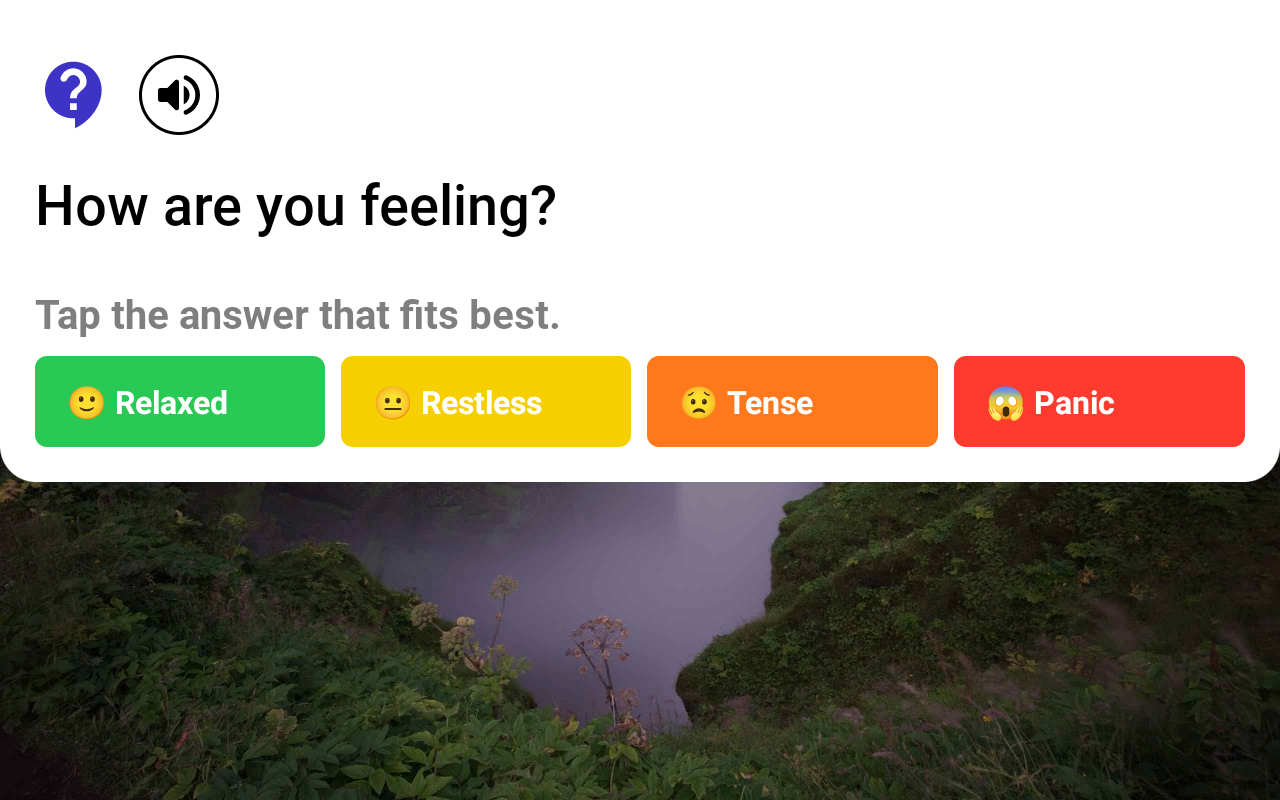
Section titled “On the Genus: one tap to answer”The question appears on the Genus like any other message, with its subject and text. Below them are four large buttons, each with a face that matches the answer:
| Button | Colour | Face |
|---|---|---|
| Relaxed | Green | Smiling |
| Restless | Yellow | Neutral |
| Tense | Orange | Worried |
| Panic | Red | Frightened |
The client taps the answer that fits. The question closes and the answer goes back to the care organisation.
What happens with the answer
Section titled “What happens with the answer”Every answer is kept with the message. Three of the four also raise an alert:
| Answer | Alert |
|---|---|
| Relaxed | No alert |
| Restless | Alert |
| Tense | Alert |
| Panic | Alert |
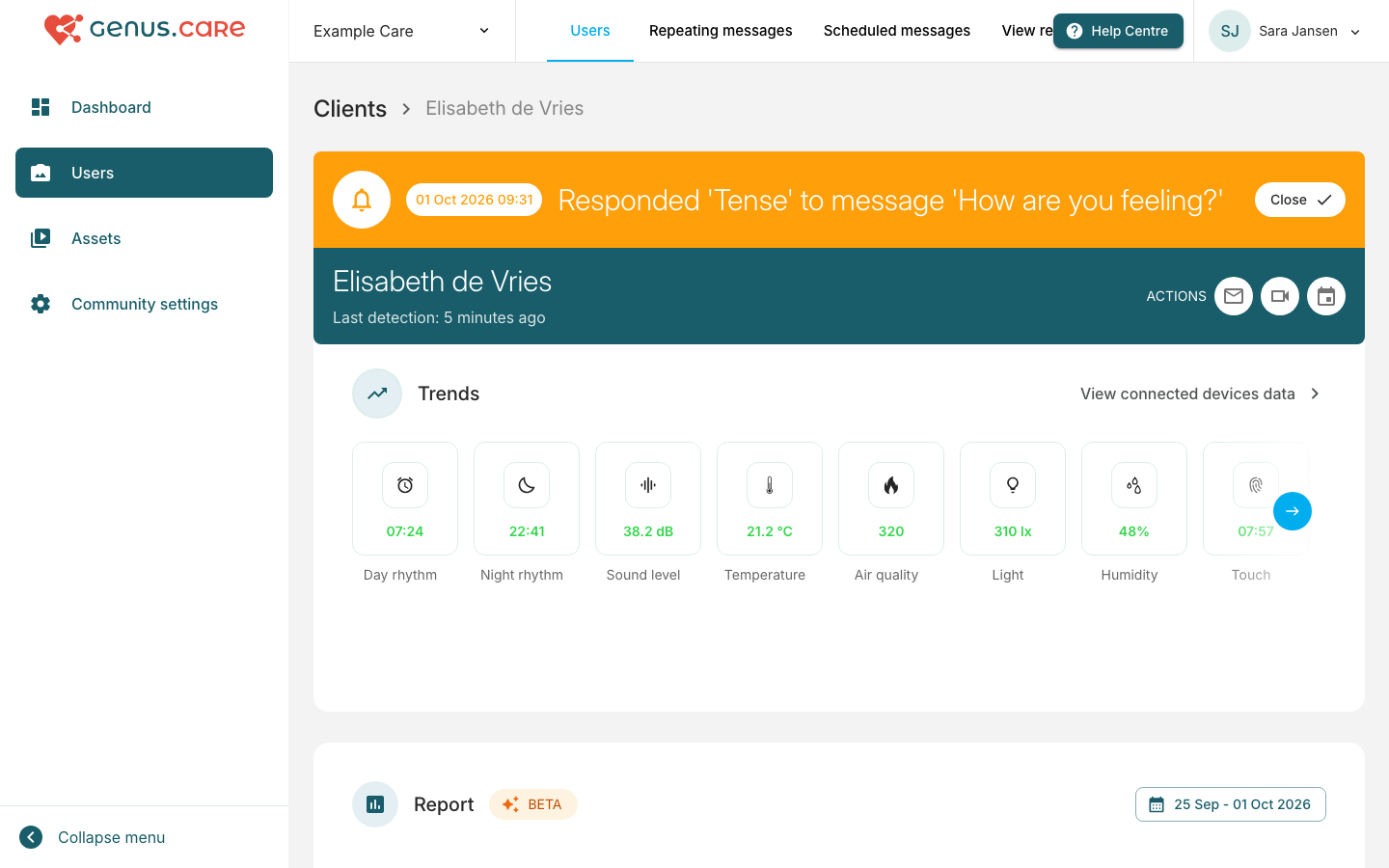
The alert names the answer and the question, for example Responded ‘Tense’ to message ‘How are you feeling?’. It has normal priority, the same as a temperature alert. It goes to two places:
- The care organisation that sent the question. Other organisations the client is linked to do not receive it.
- Family members with full access, in the Genus app.
In the Community Portal
Section titled “In the Community Portal”The alert shows in the Alerts column of the client list and at the top of the client’s page, with the time and the answer. Once you have followed it up, click Close on the client page to close the alert for everyone.
The answers themselves are listed in the client’s Message history on the client page, and under View reactions for every question your organisation sent. For a question sent to several clients, Avg rating shows the average answer.
In the Genus app
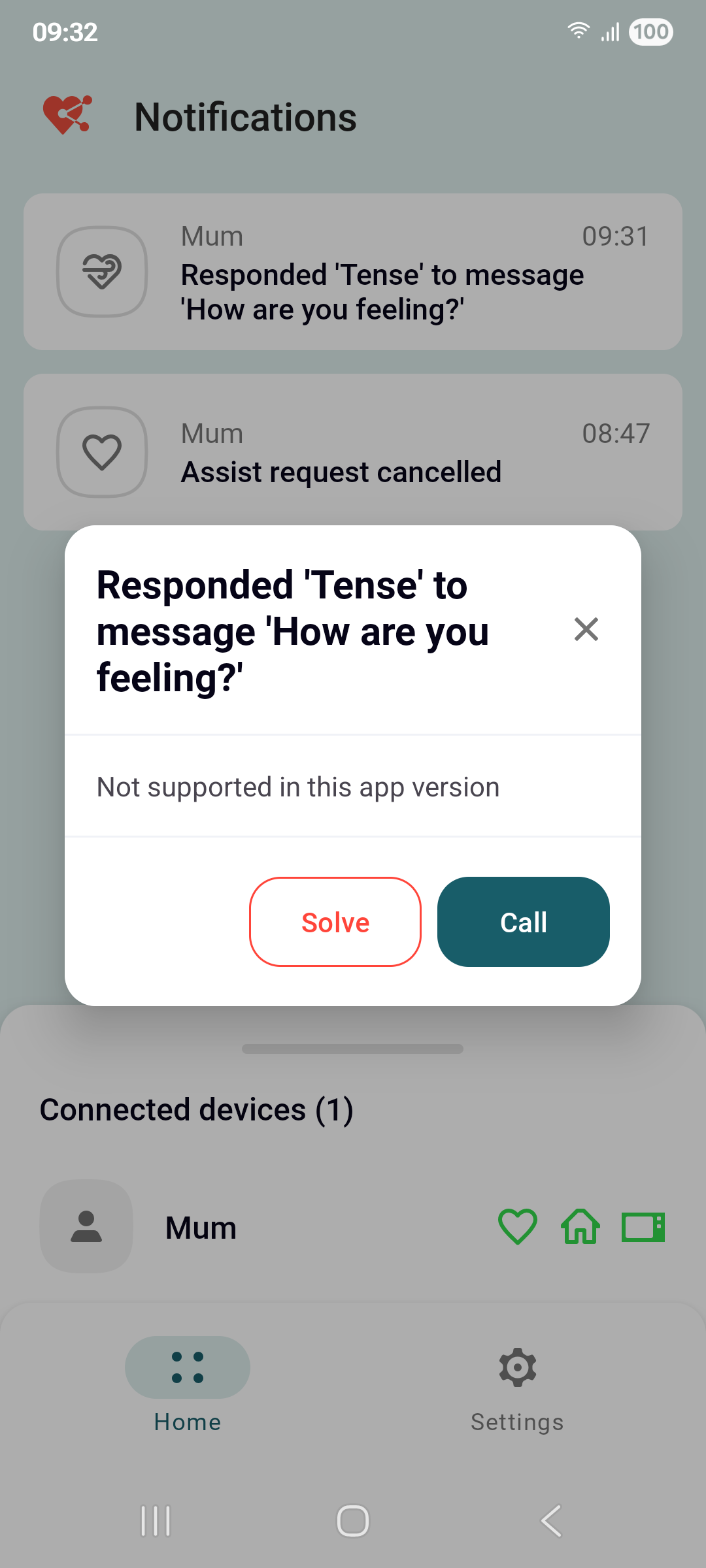
Section titled “In the Genus app”Family members with full access get a notification. The alert opens with Call, which starts a video call to the Genus, and Solve, which closes the alert.
In the Professional App
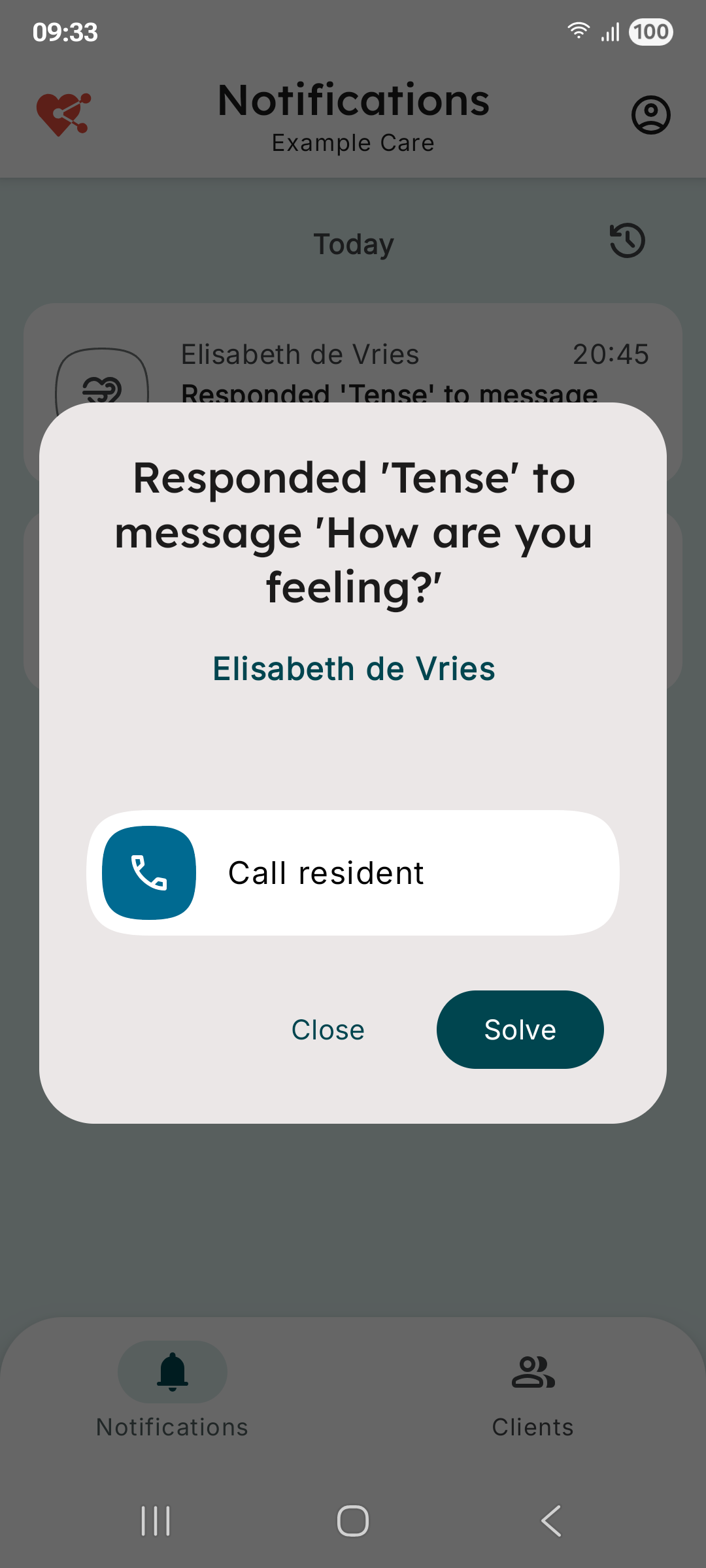
Section titled “In the Professional App”The Professional App arrived a few weeks later, in December 2025 (see the Genus Professional App). It lists these alerts under Notifications with the same title. On Android, tapping one offers Call resident, Close and Solve.
Since then
Section titled “Since then”From late 2025 the Community Portal dashboard also lists these alerts, with Medium priority (the dashboard). Since April 2026 the Professional App shows each new alert as a phone notification as well (spring 2026). How the question works today is on “How are you feeling?”; all alert types are on alerts and alarms.
Availability
Section titled “Availability”The Community Portal and the Genus were updated automatically. The type of reply Stress level appeared in the Community Portal in October 2025. The Genus shows the four answers from Genus 4.3.2 (November 2025), when the alerts started as well.
- Family members see the alerts after updating to Genus app 2.3.9 for Android or Genus app 2.2.6 for iPhone.
- Genus PAL has no screen, so the question is not available there.