

Genus update: winter 2026
This winter the Professional App put assistance requests on care professionals’ phones, with teams and escalation (the Professional App). The Genus began to play videos sent from the Community Portal (video on the Genus). Care homes got nurse call with Genus Assist buttons (nurse call), and smoke detectors joined the Genus (smoke detectors). The first iLogs Safe Motion watches were connected as well (iLogs). The work on the Nedap ONS connection that started in January is described in Nedap ONS, reworked. This page collects everything else that changed from January to March.
The Genus
Section titled “The Genus”Calls announced in the client’s language. When the Genus answers a call by itself, as it does during an alarm, it first announces the call aloud. Since Genus 4.7.0 in March, it does so in the language of the Genus: Dutch, English, French, German, Spanish, Portuguese or Greek.
Since Genus 4.7.2 a short sound comes before the announcement, as it does before the Genus speaks other texts. See calls and Call Me.
Community Portal
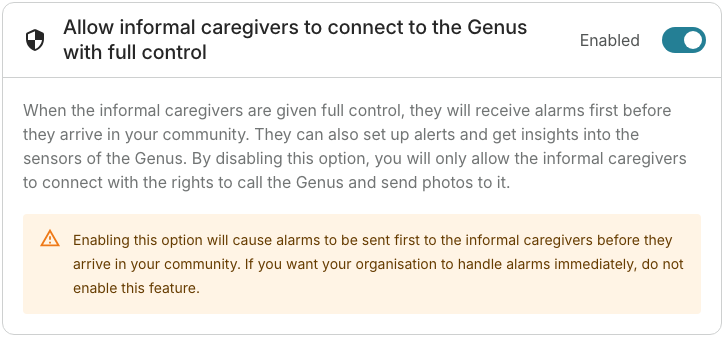
Section titled “Community Portal”Full access for family members is now a choice. A family member with full access receives the client’s alarms before the care organisation does, and can see sensor information. Some care organisations want to handle every alarm themselves. Since February a health administrator decides this, under Community settings → Default Genus configuration.
- Off by default. The setting Allow informal caregivers to connect to the Genus with full control is off for every care organisation, including existing ones. A health administrator can switch it on. The portal warns that alarms then go to family members first.
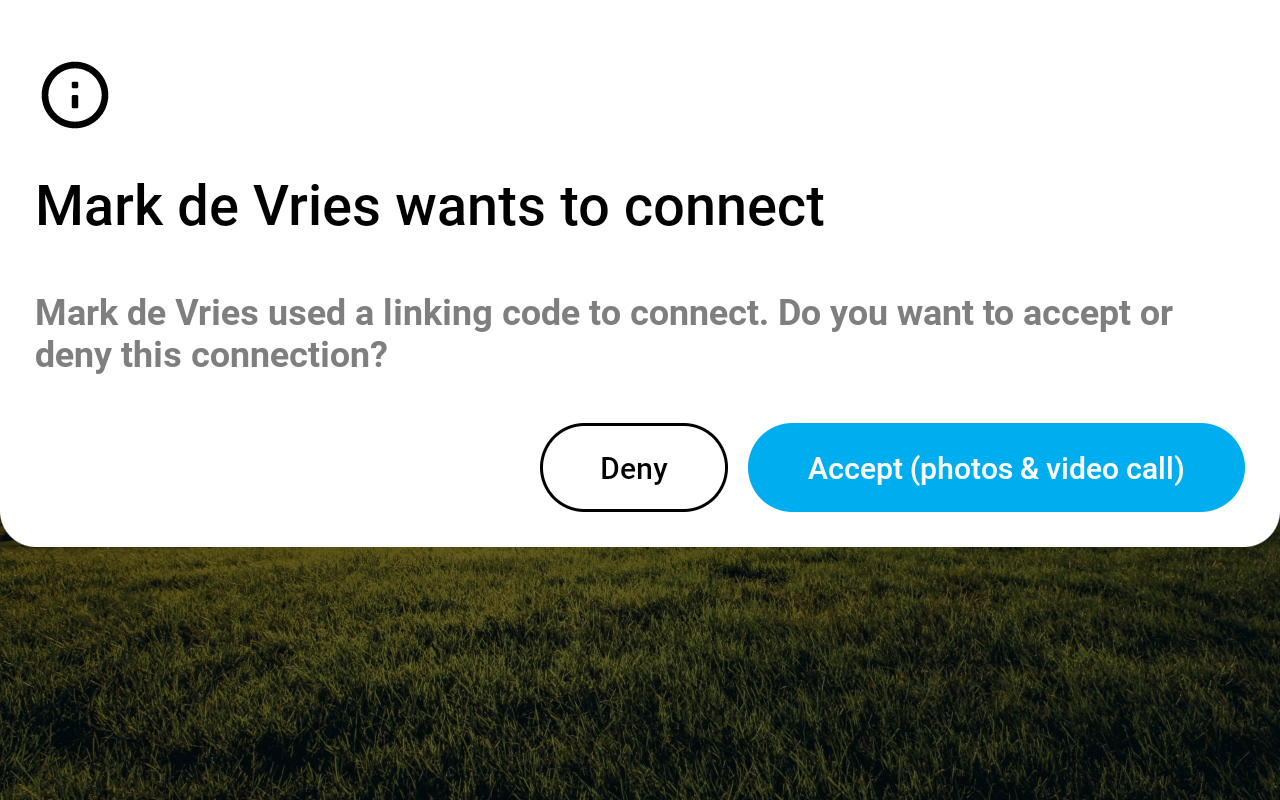
- On the Genus. When a family member enters a linking code, the client’s Genus asks whether to accept. With the setting off, it offers Deny and Accept (photos & video call). With the setting on, Accept (fully) is offered as well. This works from Genus 4.7.0 (March).
- Photos and calls. Family members who connect without full access can call the Genus and send photos to it.
- Existing connections stay as they are. The setting applies when a family member connects. It does not change the access of anyone already connected.
- More than one care organisation. If one of the client’s care organisations allows full control, the Genus offers it. A Genus without a care organisation always offers it.
See family access and privacy.
Repeating appointments in the client calendar. Since January, an appointment in a client’s calendar can repeat. Under Repeat you choose every so many days, weeks, months or years. A weekly appointment repeats on the weekdays you pick. A monthly one repeats on a date or on a weekday, such as the first Monday. A repeat ends on a date or never.
The client calendar was rebuilt in September 2026, which also changed how repeating appointments work. See one calendar for the client, the family and the care team and the client calendar.
The Community Portal in French. Since January the Community Portal is available in French, including the guided tours. Each person chooses their language on their profile page, under Choose language. In March the Spanish translation was completed as well. See supported languages.
Cliënt in Dutch. The Dutch portal now speaks of cliënten instead of gebruikers. This shows in the title of the client list, in the side menu and in buttons such as Cliënt toevoegen. In English the client list is now titled Clients instead of Users.
A client’s national identity number. A client’s contact information has a new field for the national identity number. Its name follows the language of the portal: BSN in Dutch, NIR in French, NIF in Portuguese and NINO in English. You fill it in under Edit contact information. The number then appears at the top of the client’s page and on the report from Get report. See the client page.
Connected devices on the client page. In March the Connected alarm buttons block on a client’s page became Connected devices. It lists all of the client’s devices, sensors as well as buttons, with Last seen and Battery for each. Most devices can be removed with Delete, in the menu at the end of their row. See the client page.
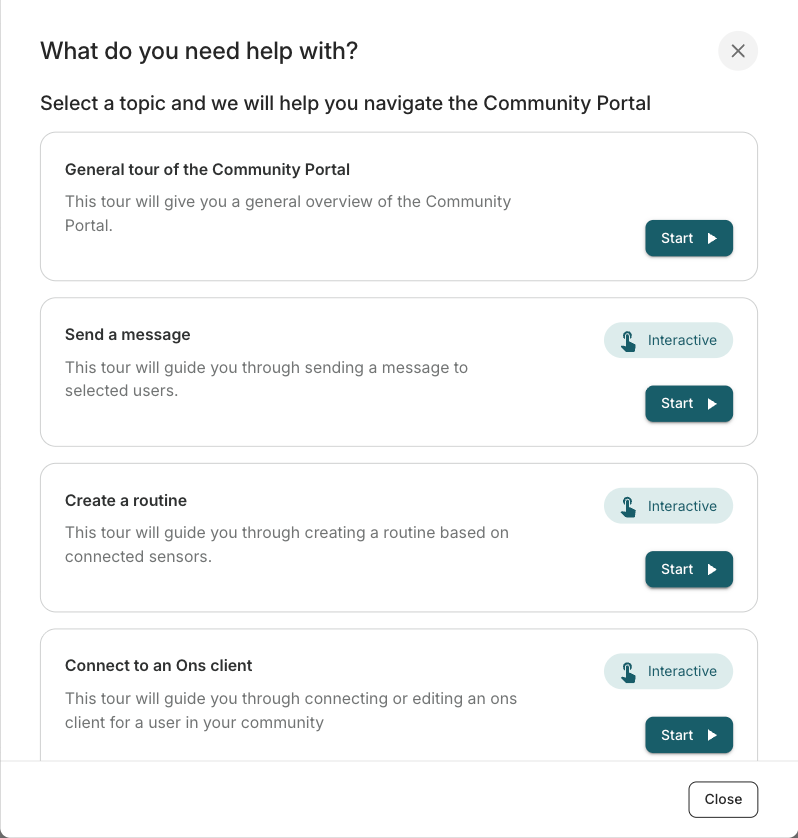
Guided tours for every care organisation. Since February every care organisation has the Help button at the top of the Community Portal, now called Help Centre. Its step-by-step tours cover a general tour of the portal, sending a message, creating a routine and connecting a client to Nedap ONS. See the guided tours release and help and guided tours.
Professional App
Section titled “Professional App”Notifications follow your teams. Since February, the Notifications list in the Professional App shows what concerns the teams you chose. An assistance request appears once it reaches one of your teams or everyone in the organisation. Alerts and Call Me requests appear for the clients in your teams.
- Without a team you see all alerts and Call Me requests, and assistance requests once they reach everyone.
- The dashboard of the Community Portal lists notifications by the same teams, as chosen in the app.
- Your phone already notified you only about your teams’ assistance requests. That has not changed.
See responding to notifications and escalation and teams.
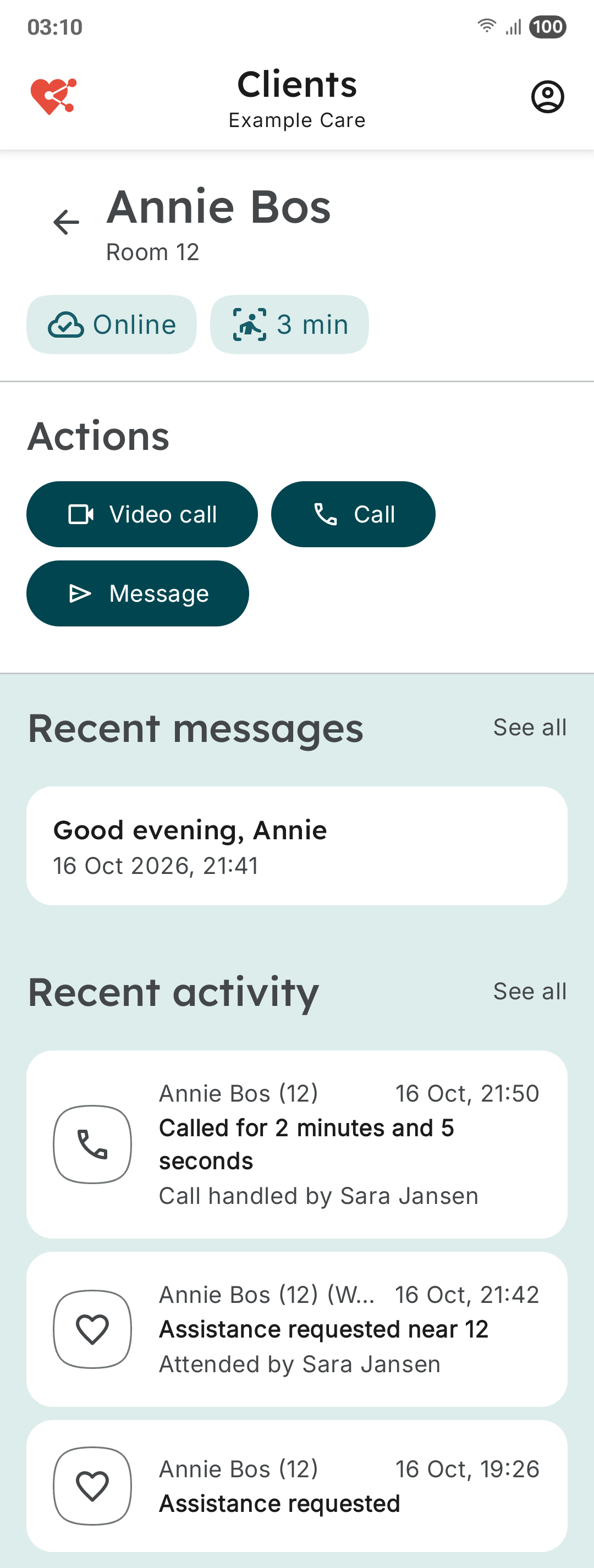
Connected devices. Since Professional App 1.2.0 (February), a client’s page has a Connected devices section. Each device shows its name, its battery level and when it was last seen. See all opens the full list. See clients in the Professional App.
An alarm tone of its own. Since Professional App 1.3.0 (March), an assistance request sounds with a Genus alarm tone instead of the phone’s notification sound. It plays at the phone’s alarm volume.
Video calls on the speaker. A video call from the app now starts on the phone’s loudspeaker. A voice call still starts on the earpiece (1.3.0).
Dates and times follow the language and the 12-hour or 24-hour setting of your phone (1.3.0).
A new Profile. In Professional App 1.4.0 (March), the account icon at the top right opens Profile. It shows your name and email address, your Community and the Teams you chose, or No teams selected. Under Actions you find Change community or teams and Log out, and your current choice is already ticked when you change it. See getting started with the Professional App.
Battery optimisation. Android can hold back notifications from apps that run in the background. Since 1.4.0 the app asks you to switch off battery optimisation for it, under Disable battery optimization. Open settings takes you to the phone’s settings. With Not now the app asks again the next time it starts.
Business Portal and deployment
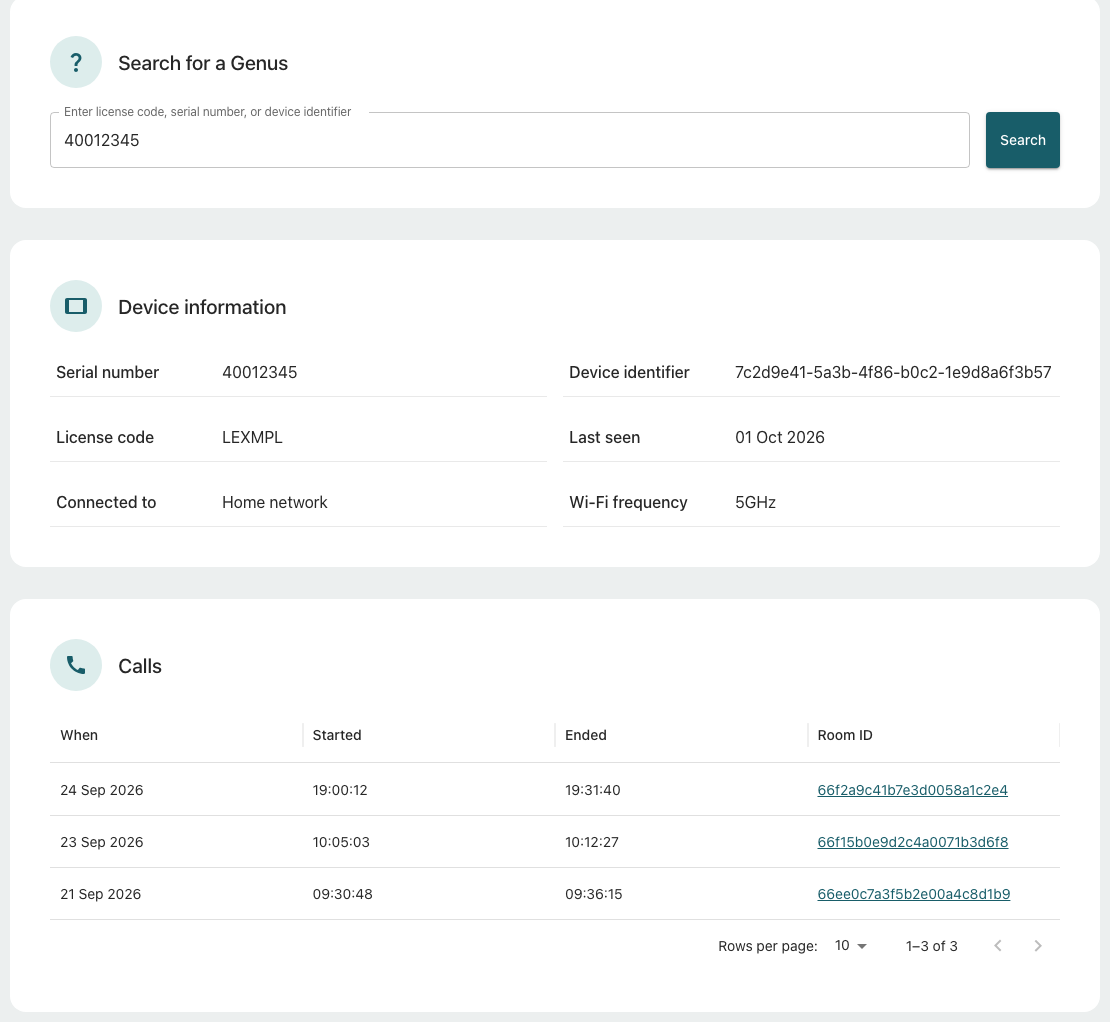
Section titled “Business Portal and deployment”A Support page. Since March the Business Portal has a Support page (since July 2026 the same information is on the subscription page; see device information and support). Distributors, resellers and customers find a Genus there by its licence code, serial number or device identifier. The page then shows:
- Device information: the serial number, the device identifier, the licence code and when the Genus was last seen;
- the network the Genus is using at that moment: the Wi-Fi network and its frequency, or the type and name of the mobile network;
- its recent Calls, with when each one started and ended.
You only find Genus devices under your own subscriptions. The network details only appear when the Genus is switched on and online, with Genus 4.6.1 or later. See device information and support.
Devices and integrations
Section titled “Devices and integrations”Bluetooth sensors. Since Genus 4.6.0 (February), sensors can also connect to the Genus over Bluetooth. Under Connect → Devices (sensors) → Add a new device, choose Genus Sensor (Bluetooth). Keep the sensor next to the Genus and press its button if it has one; the Genus finds the sensor and sets it up.
Depending on the model, a Bluetooth sensor reports movement, a door opening, temperature or humidity, and its battery level. The sensors that connect through the Zigbee gateway are now listed as Genus Sensor (Zigbee). Genus models that do not support Genus Assist, such as the GC200, do not offer Bluetooth sensors either. See adding and testing devices.
Alarm forwarding with GET requests. Forwarding alarms to another platform over HTTP can now use GET requests instead of POST, for platforms that only accept those. Genus then calls the address set for a new alarm, a cancelled alarm or a new alert, without sending further details. Genus sets this up for a care organisation on request. See alarm forwarding.
Platform and security
Section titled “Platform and security”- Identity numbers protected. National identity numbers are stored encrypted. They appear only on the client’s page and on the report.
- A steadier Genus. Genus 4.6.2 (February) makes the Genus more stable.
- A steadier Professional App. Several improvements in versions 1.2.1 and 1.3.0 make the app more stable.
- Editing customers. Distributors can now edit a customer’s details in the Business Portal.
Availability
Section titled “Availability”- The Community Portal, the Business Portal and the platform were updated automatically.
- The Genus updates itself. Genus 4.6.0 (February) brought Bluetooth sensors, and Genus 4.6.2 made the Genus more stable. Genus 4.7.0 (March) brought the choice over full access and the call announcement in more languages, and Genus 4.7.2 the short sound before it. Genus 4.5.1, 4.6.1 and 4.8 are described in the video, nurse call and smoke detector releases.
- Care professionals get the changes by updating the Professional App for Android from Google Play: version 1.2.0 and 1.2.1 in February, and 1.3.0, 1.3.1 and 1.4.0 in March. Version 1.1.0 (January) is described in the Professional App release.
- There was no new version of the Genus app this quarter.