

Genus update: autumn 2026
In October, zone detection arrived: the care team and the family get an alert when a resident who tends to wander comes near a door (zone detection). In November the servers and portals were updated, and new versions of the Genus and the apps followed. They brought four larger changes. Genus now checks who may do what in every app and portal (roles and permissions). Times follow the client’s own clock, while dates and numbers follow the way you write them (time and notation). The Genus can warn the family and the care team when the air in the client’s room suddenly gets much worse (air quality in the home). And the Genus app on iPhone has a new design (a new look for the Genus app on iPhone). In mid-November, signing in got new pages and emails in the Genus design and in your own language (new sign-in pages and emails). A client’s alarm and alert history in the Community Portal now shows how each alarm and alert was handled (alarm and alert history). This page collects the other changes and fixes of these releases.
The Genus
Section titled “The Genus”A Genus keeps its settings when it moves to a new client. When a Genus is reset for a new client, from the Community Portal or automatically by Nedap ONS, it now keeps the settings of the device and its room. These are the language, the volumes, the display, the night screen, lifestyle monitoring, hidden and locked features, and its time zone. See resetting a Genus for a new client.
No calls from the past. A Genus that comes back online after a while does not ring for a call that has already ended, or give a reminder that is out of date. New photos, changed settings and a reset do reach it once it is back online. See calls and Call Me.
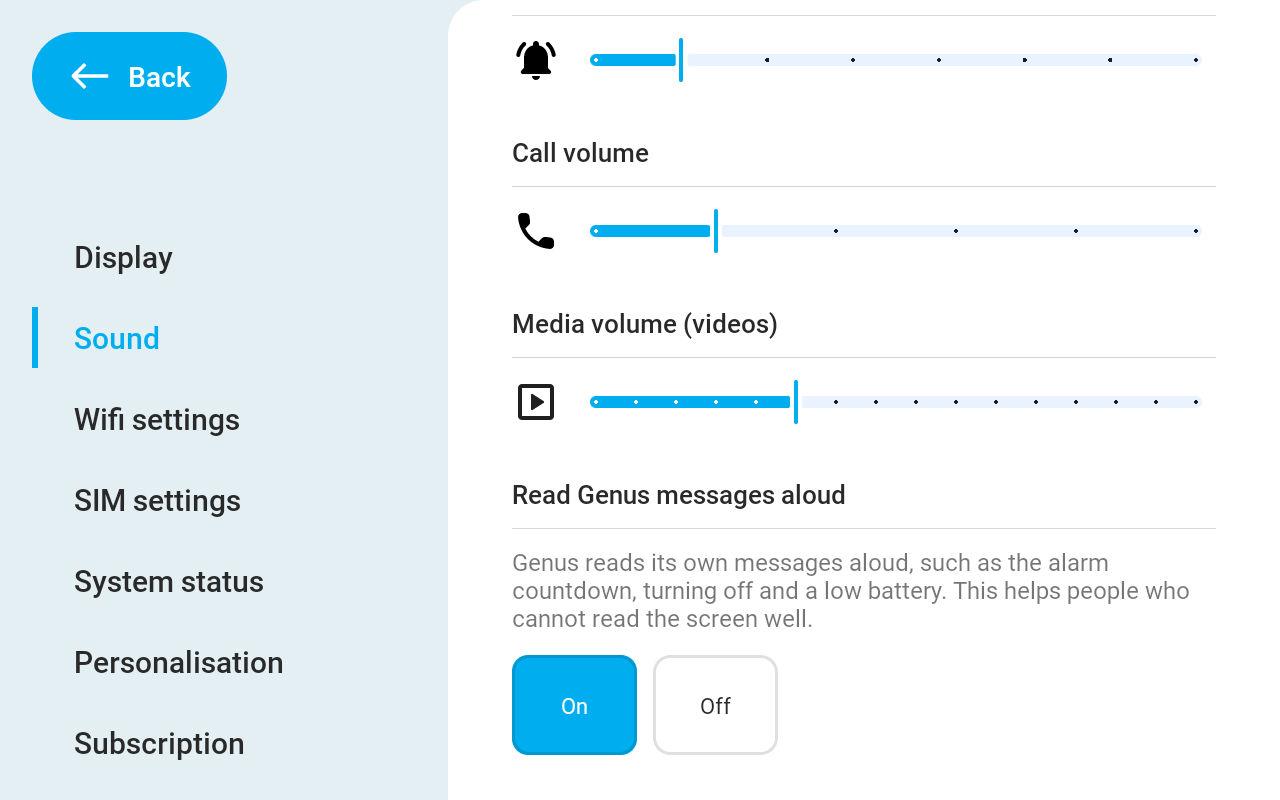
The Genus can read its own notices aloud. For clients who cannot read the screen well, Genus 4.17.0 can read its own notices aloud: the countdown of a request for help, the messages when such a request cannot be sent, the question before it turns off, a low battery warning and a lost internet connection. Switch it on under MENU → Settings → Sound → Read Genus messages aloud; it is off until someone does. The Genus also speaks its notices when it has no internet. Since Genus 4.18.0 the setting is called Spoken messages, and the care organisation and the client choose per message what the Genus reads aloud; see choose which messages the Genus reads aloud.
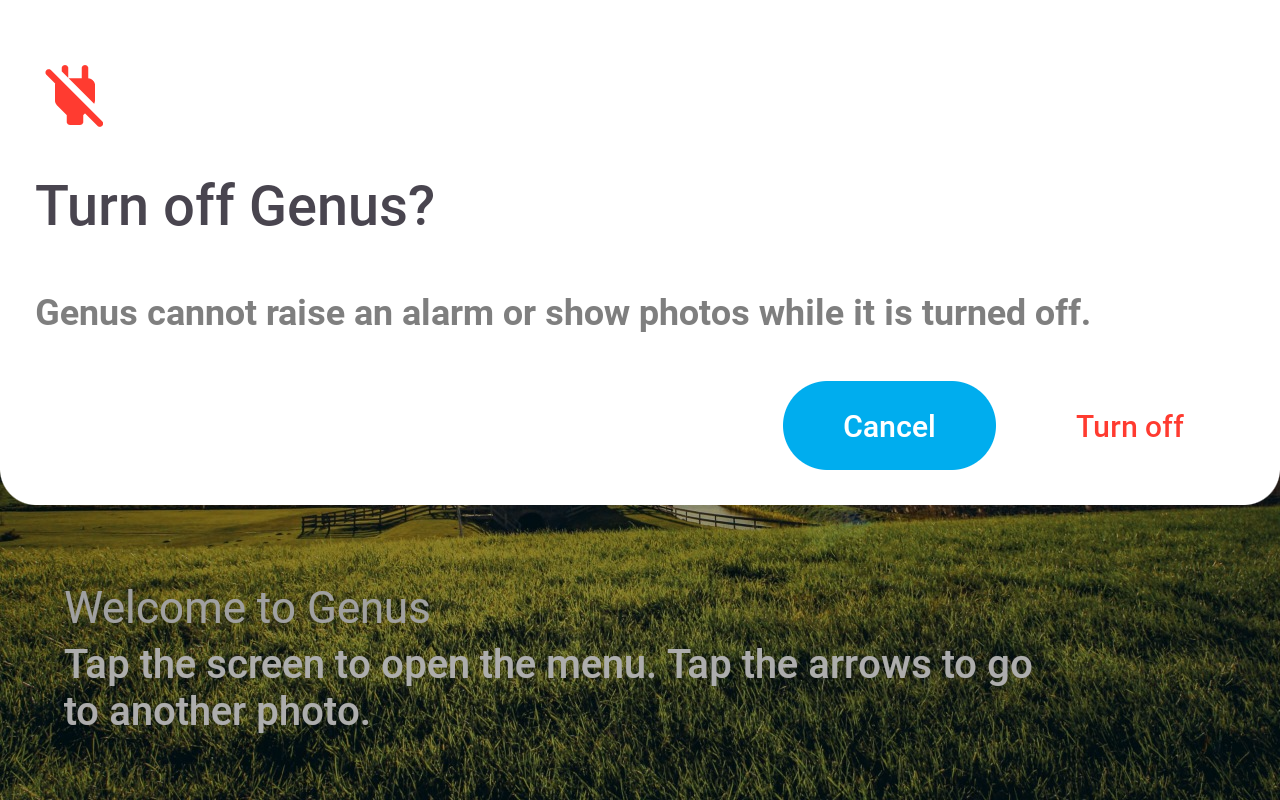
A question before the Genus turns off. When the power button of a GC300 or GC320 is held, the Genus now asks Turn off Genus?, so that a client cannot switch it off by accident. It explains that it cannot raise an alarm or show photos while it is off. Only Turn off switches it off; with Cancel, or without an answer, it stays on. While a request for help or an incoming call is on the screen, the power button does nothing. See switching off with the power button.
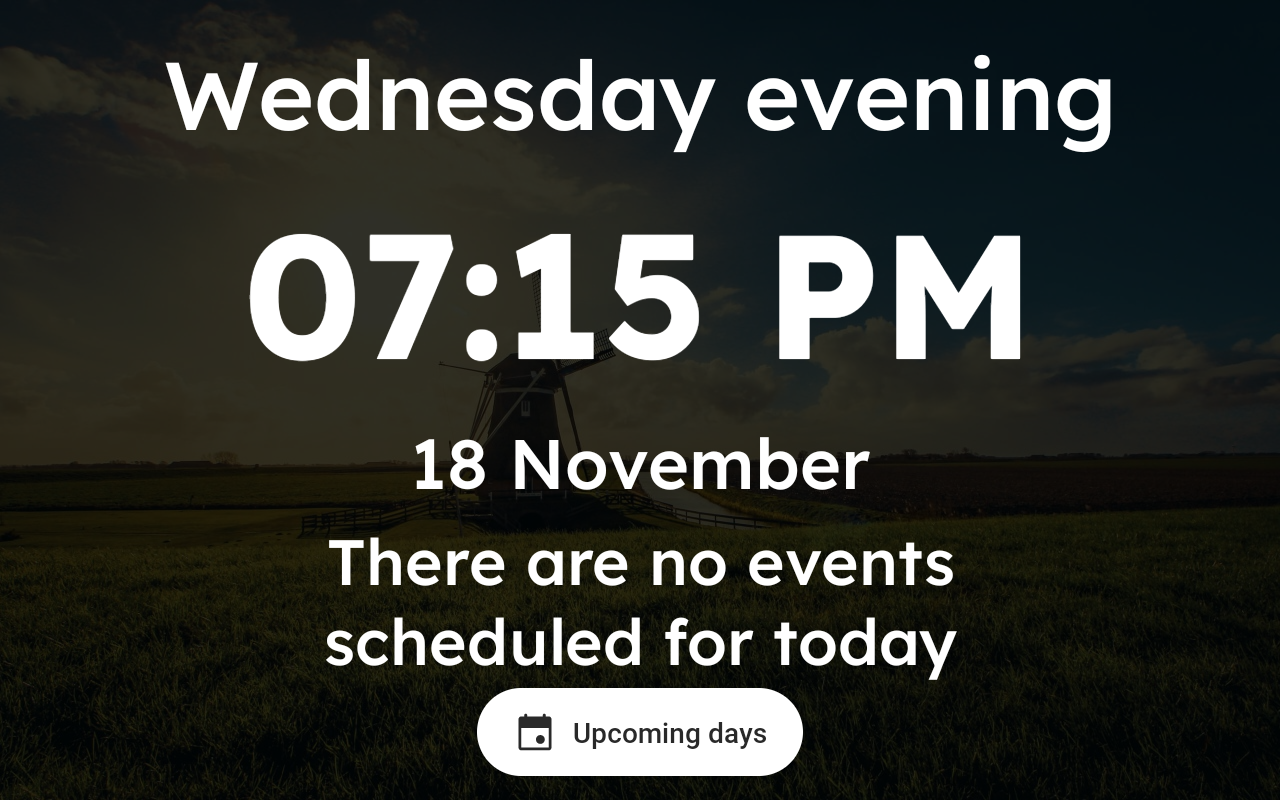
Upcoming days from the Day Overview. A Genus that shows the Day Overview on its home screen has an Upcoming days button above the clock in Genus 4.18.0. It opens My Day, where the client can look ahead to the coming days. When the care organisation has hidden My Day, the button is hidden too; when My Day is locked, the button asks for the PIN. See the Day Overview on the home screen.
An arrow when My Day has more. When a day has more appointments than fit on the screen, a green arrow at the bottom of My Day now shows that there is more. Tap it to scroll down. See My Day.
Larger text in notices. The explanation in the notices and questions of the Genus, such as an appointment reminder, a low battery warning or a request to link a phone, is a fifth larger, so it is easier to read.
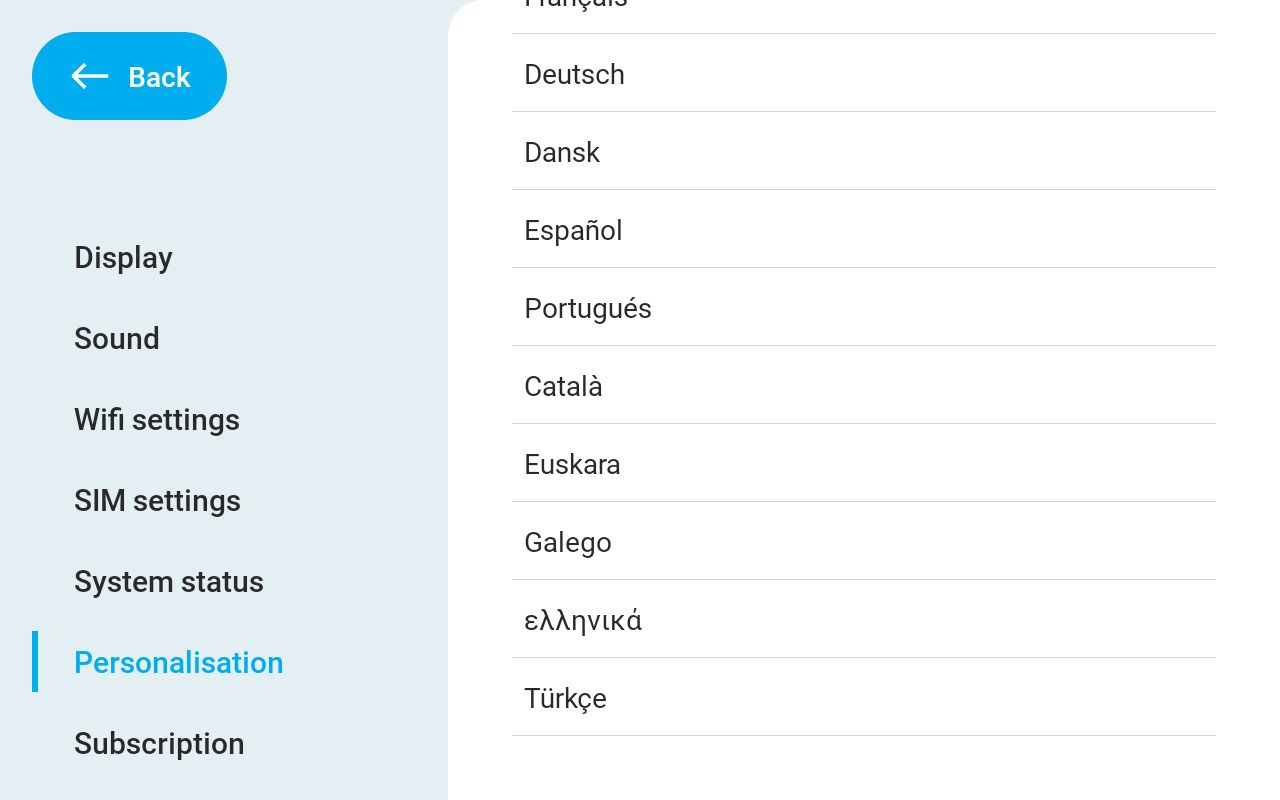
Turkish on the Genus. Genus 4.18.0 is also available in Turkish. Choose Türkçe on the Genus itself, when it is set up or later under Settings → Personalisation. The Community Portal and the setup configuration of the Business Portal do not offer Turkish yet. See supported languages.
Spanish with a voice from Spain. A Genus set to Spanish now speaks reminders, messages and announcements with a voice from Spain. See supported languages.
Community Portal
Section titled “Community Portal”The Call Me pop-up names the client. When a client asks the care organisation to call back, the pop-up Call me request now says who asked, for example Elisabeth de Vries has requested a call from the community. See pop-ups in the Community Portal.

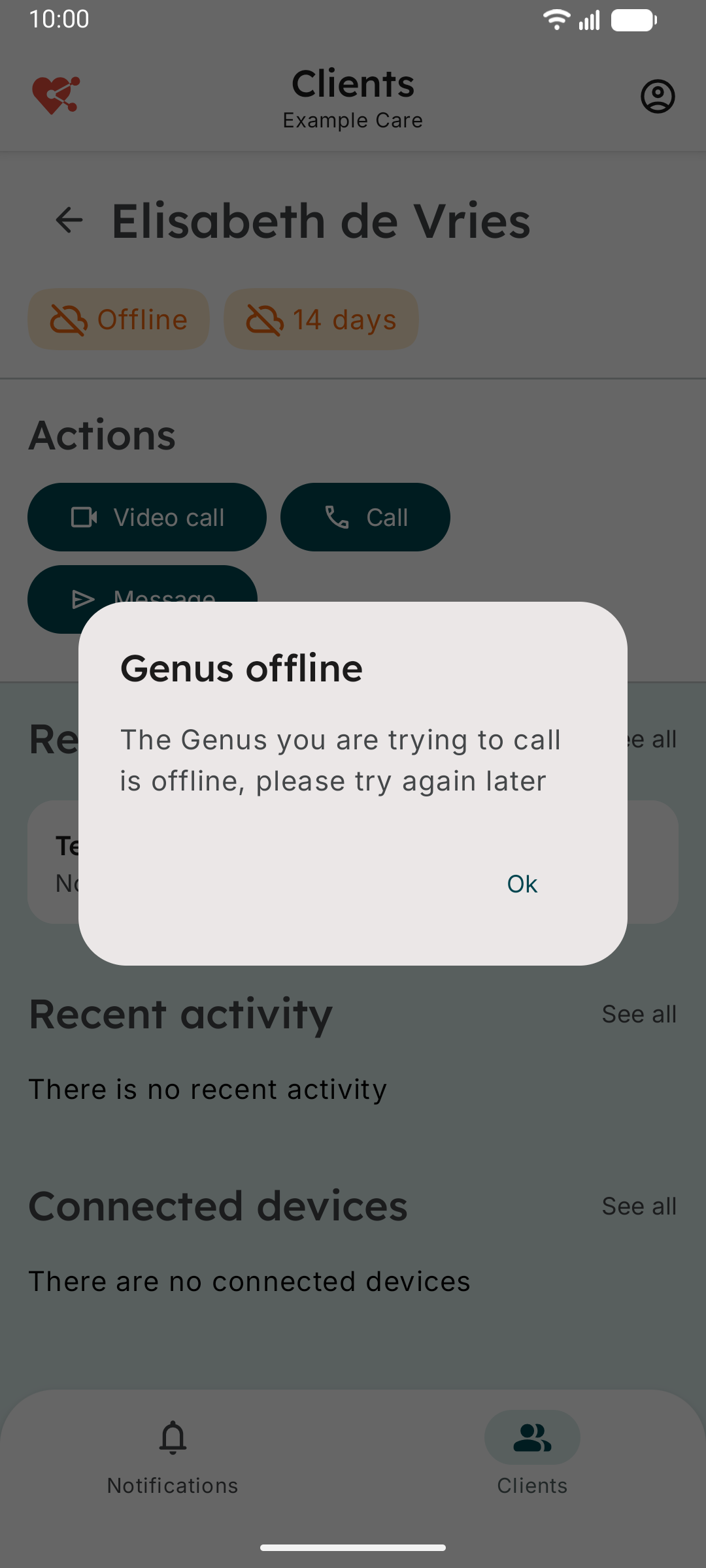
A Genus that is offline is not called. A video call to a Genus that is offline now stops straight away, with Failed to start a video call. See video calls and livestreams.
A reset for a new client starts clean. After Reset Genus, the new client page starts without a NINO, an address or a link with a Nedap ONS client. Fill these in for the new client. A Genus linked to a room in Nedap ONS keeps its room and the building’s address. See resetting a Genus for a new client.
Settings as tiles. On Community settings and on a client’s page, the Genus settings are now shown as tiles that you can read at a glance. Edit opens a dialog in which you change them and click Save. See configuring a Genus from the portal.
Professional App
Section titled “Professional App”Calls that nobody answers end by themselves. A call to a Genus that is offline now ends at once with Genus offline: The Genus you are trying to call is offline, please try again later. This works with every version of the app, on Android and iPhone. Professional App 1.7.0 for Android and 1.1.0 for iPhone also end a call that the Genus does not answer, with Genus not available. See calling a client’s Genus.
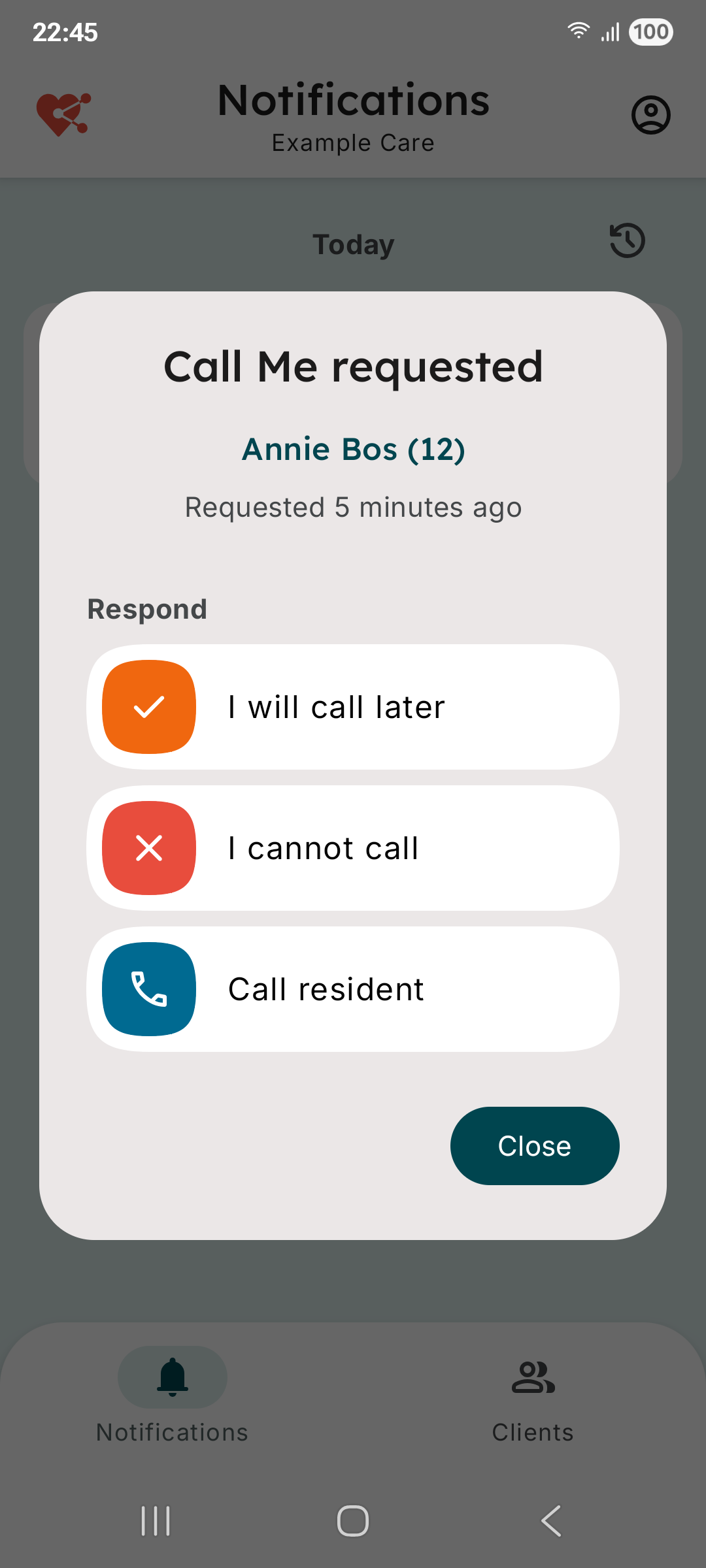
The Call Me request names the client. When you open a Call Me request, the app now shows who asked, with the room number in brackets, such as Annie Bos (12). See answering a Call Me request.
Video is starting. In a video call, the Genus’s picture can take a few seconds to arrive after the Genus answers. The call screen now shows Video is starting… with a spinner until it does. See calling a client’s Genus.
Alerts on iPhone. Since Professional App 1.0.1 for iPhone, released in October, alerts arrive as a notification on the iPhone too, as they do on Android. The notification names the client and the room, and disappears once someone solves the alert. Notifications also use the Genus sounds when the app is closed: the alarm tone for an assistance request, a softer tone for alerts and Call Me requests. See notifications on your phone.
Genus app
Section titled “Genus app”Your own name for a Genus. When you leave Genus alias empty on iPhone, the app now shows the client’s name again, as it already did on Android. See your own name for a Genus.
Tapping a notification opens the request. In the Genus app 2.6.0, tapping the notification of a call for help opens its Emergency notification screen, on Android and iPhone. On Android, tapping Call requested opens the call request. On iPhone, a new call for help also appears as a banner while the app is open. See calls for help and Call Me.
Withdrawing a link request. To withdraw a request to link your phone, press and hold the Genus that is Waiting for approval… on Home and tap OK. The app confirms Linking request cancelled successfully, and the Genus stops asking about the request. See linking to a Genus.
The same icons in every app. The Genus app 2.6.0 for Android uses the same rounded icons as the app on iPhone and the Professional App. Calls for help and alerts on Home now show the icon that belongs to them, such as a bed, a door, a fall or a medicine reminder. The new design on iPhone is described in a new look for the Genus app on iPhone.
German and French on Android. The Genus app for Android is now fully translated into German and French. In Dutch, German, French and Spanish, the app now also calls the device the Genus everywhere. See supported languages.
Business Portal and deployment
Section titled “Business Portal and deployment”The Deployer app keeps subscriptions in order. Genus checks every deployment: each Genus has one subscription, and it stays with its own reseller.
- Deploy is refused for a Genus that still has an active or paused subscription. Move such a Genus with Transfer or Replace.
- Deploy after a reset. A Genus that was reset gets its own subscription back, if no other Genus has taken it over.
- Transfer only moves a Genus to a customer of the same reseller.
- Replace moves the client page in the Community Portal to the new Genus, with the name, address, room number, groups, team and alarm settings.
The Deployer app 1.4.0 applies these rules as soon as a Genus is scanned:
- Under Deploy Genus, the app checks each Genus right after the scan. A Genus that is already in use gets the note Already in use at with its community or customer, and Use Transfer or Replace. The app only continues once such a Genus is removed from the list.
- Under Transfer Genus, Select a customer only lists customers of the reseller the Genus devices belong to. Genus devices of different resellers are transferred separately.
- The last screen asks you to switch on the Genus devices within seven days.
Older versions of the Deployer app end with Error when Genus refuses a deployment. See the Deployer app.
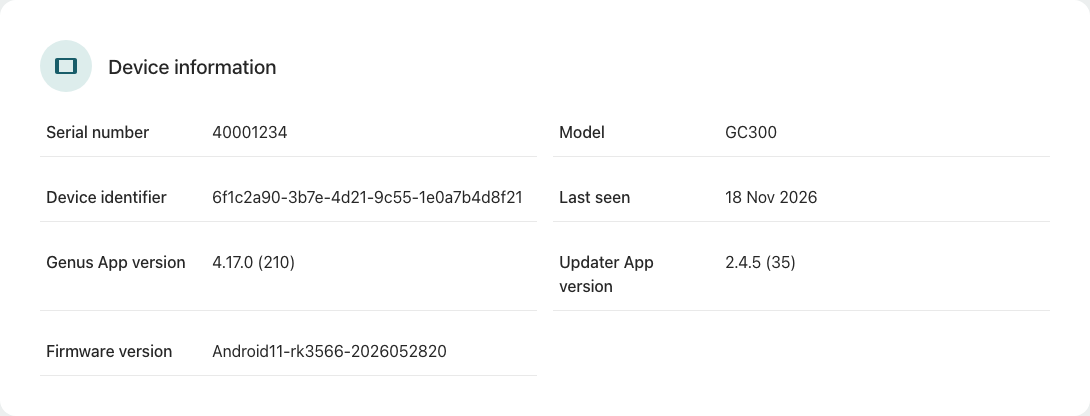
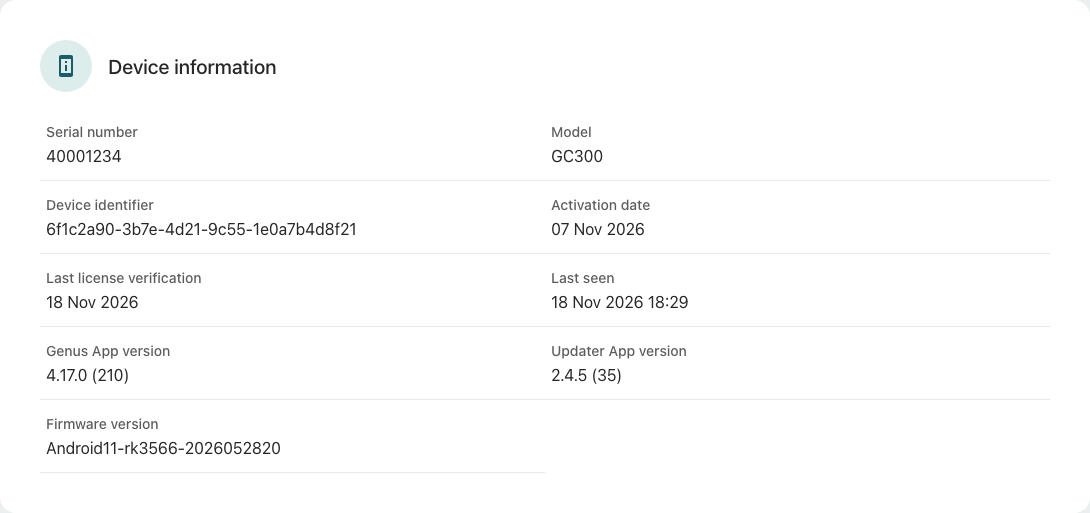
Software versions on the Support page. The Support page now shows the Genus App version and the Updater App version under Device information. You see whether a Genus is up to date without opening its subscription. See device information and support tools.
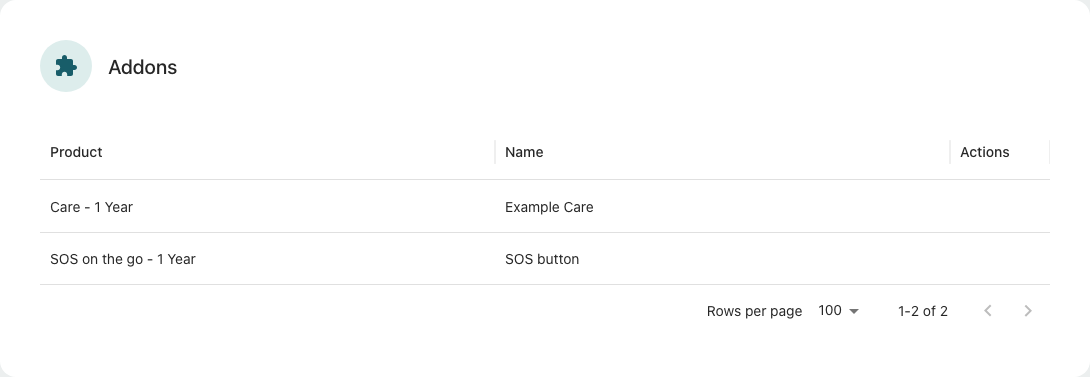
The care organisation on the Care add-on. The Addons block of a subscription now has a Product and a Name column. For the Care add-on, it shows the care organisations the Genus is connected to. In the subscriptions list, it appears in brackets when you point at the add-on’s icon. See add-ons.
Unlinking a community. When you unlink a Genus from a community on its subscription page, the subscription is disconnected from that community too. See unlinking.
Model and firmware version. The Device information of a Genus, on the Support page and on its subscription, now also shows its Model, such as GC300, and its Firmware version. See device information and support tools.
Devices and integrations
Section titled “Devices and integrations”What the alarm button says. If passing an alarm on takes a moment longer, the Genus 4G GPS Button and the Genus PAL say The alarm is being sent. See alarm buttons.
Voice calls from another platform. When a care organisation forwards its alarms to another platform (External), every Genus of that organisation now gets the SIP address the platform uses to call it, without anyone setting it up by hand. See alarm receiving centres.
Nedap ONS: a reset when a resident moves. With Reset Genus when a new client occupies the room switched on, a change of resident resets the Genus, and the new client page starts without the previous resident’s details. A Genus that is offline at that moment is reset when it comes back online. See Nedap ONS.
The Reporting API. The Reporting API takes API tokens with the Reporting permission. Values per day, such as
steps and bed detections, follow the client’s own days, as the client report does
(time and notation). See the Reporting API.
Clearer answers from the Alarm API. A refused request now gets ACCESS_DENIED_ERROR (HTTP 403). A Genus that is
unknown, or not linked to your care organisation, gets FRAME_NOT_FOUND_ERROR (HTTP 404). A token that Genus did not
issue gets HTTP 401. See the Alarm API.
The video call instructions page takes https links only. The page that shows your users how to join a Genus video
call only accepts a call link that starts with https://. See
video calls through the API.
Platform and security
Section titled “Platform and security”- Who may do what. Genus checks who may do what in every app and portal; see roles and permissions.
- Tighter checks. The servers apply stricter checks to the requests they receive.
- Ready for busy moments. The platform handles busy moments better.
- Kept up to date. The platform was moved to current versions of the software it is built on.
- A steadier Genus. Several improvements in Genus 4.17.0 make the Genus more stable.
- Scheduled messages. A scheduled message goes to the clients who are linked to the care organisation at the send time. See messages.
- My Day. The All day label in My Day now has the room it needs. See My Day.
- Battery alerts of the Genus. A low battery alert stays open until the Genus has charged, and then closes by itself. Switching the battery alert off also closes an open one. See device monitoring.
- Messages on Android. When a message can’t be sent, for example without a connection, the Genus app says Failed to send message, and you can tap Send message again. See sending a message.
- The calendar without a connection. When the appointments of a day can’t be loaded in the Genus app on Android, the calendar says Error loading events, with Try again. See the calendar in the Genus app.
- Alert settings on Android. Save appears when every alert value is within its range, for example a minimum temperature between 0 and 50 °C. The message under the field says what is allowed. See changing when the Genus raises an alert.
- Notification texts on Android. A call for help without a title of its own shows Assistance requested in the Genus app.
- A steadier Genus app on Android. Several improvements make the Genus app for Android more stable.
- Smaller fixes in the Genus app for Android. A linking code typed in lower-case letters is now accepted, and the row of dates in the calendar keeps the chosen day in the middle.
- Message subjects. The Subject of message field stops at 255 characters.
- A client’s page. A client’s page in the Professional App updates as soon as an assistance request comes in or is resolved. See a client’s page.
- Past notifications. Past notifications now always open on today. On iPhone the header now says Today and Yesterday, as on Android. See past notifications.
- A steadier Professional App. Several improvements make the app more stable.
- Calls on iPhone (1.0.1, October). Call resident in an assistance request checks camera and microphone access first, like the other call buttons, and shows Camera & Microphone Required when access is switched off.
- Genus PAL in the Business Portal. Generate linking code is now offered only on Genus PAL subscriptions, and Unlink no longer appears for the button of a Genus PAL. See Genus PAL.
- Translations. Buttons on the Genus in Spanish, Portuguese, Galician and Basque were corrected, and its Catalan texts were revised. The Business Portal shows a few more texts in Dutch for Dutch users.
Availability
Section titled “Availability”- The Community Portal, the Business Portal and the platform were updated automatically in November. Their changes work with every version of the Genus and the apps.
- The Genus received Genus 4.15.0 in October, with zone detection, and Genus 4.17.0 and Genus 4.18.0 in November 2026. The Genus updates itself; see updates and firmware. Genus 4.17.0 brings the spoken notices, the question before turning off, the changes to My Day, the larger text, the Spanish voice and the Genus fixes on this page. Genus 4.18.0 adds Turkish and the Upcoming days button.
- The Genus app 2.6.0 for Android and iPhone was released in Google Play and the App Store in November 2026. The Genus app changes on this page need that version; family members get it by updating the app.
- The Professional App 1.7.0 for Android and 1.1.0 for iPhone were released in November 2026, on Google Play and in the App Store. The Professional App 1.0.1 for iPhone came out in October 2026.
- The Deployer app 1.4.0 was released in November.